Introduction
There are three main disciplines of graphics: modeling shape and appearance, animation, and rendering.
Modeling
Raster (bitmap) graphics have a fixed array of pixels with values, and a fixed resolution. Vector graphics are driven by display commands. It has a scalable resolution, which makes it ideal for typography and animation.
Rendering
The main question rendering aims to answer is: how do we make a 3D picture appear on a 2D plane?
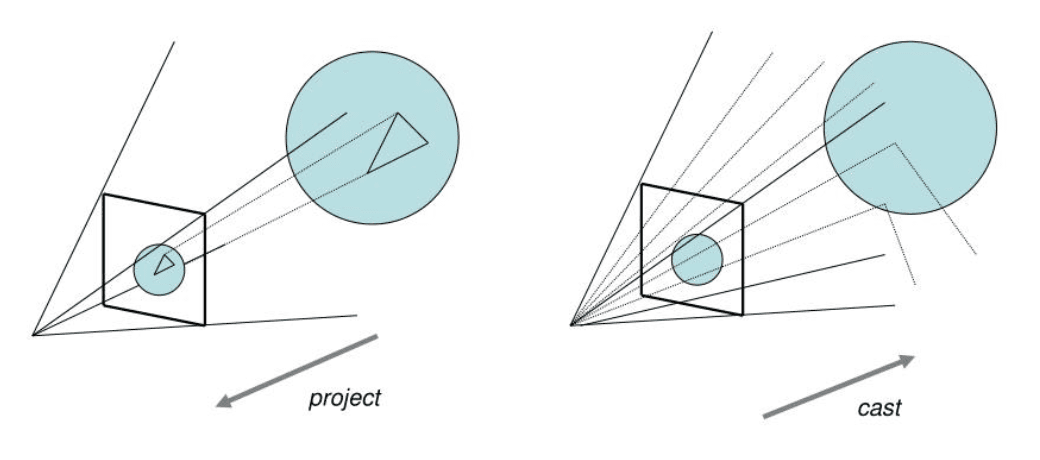
There are two ways to think about the problem:
- For every point on the paper, determine which object appears at the point
- For every object in the scene, determine which points on the paper it covers
These two approaches correspond to two major classes of rendering algorithms: raytracing and rasterization.
Raster Graphics
Images and Pixels
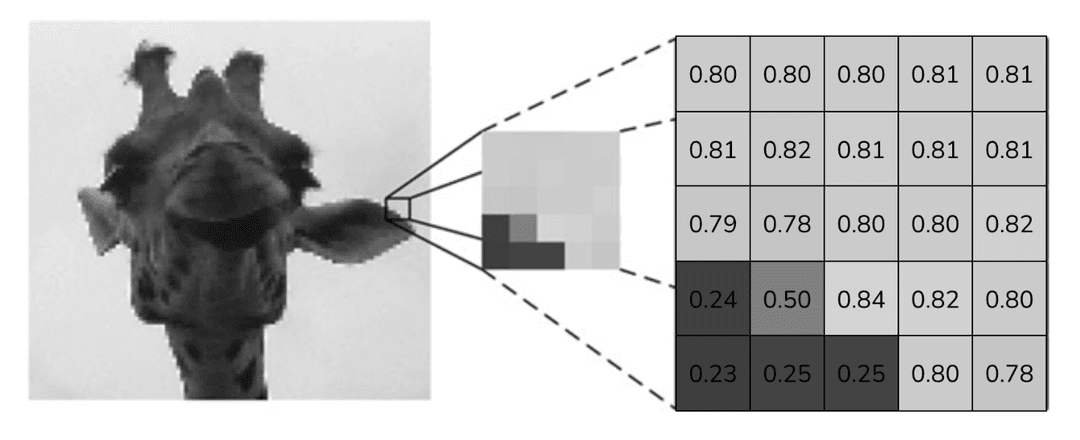
An image is a 2D grid of cells called pixels, where each pixel holds some set of values. A pixel (picture + element) is a unit with some kind of value. A pixel value can represent intensity (grayscale), color (RGB), opacity, or depth.
In the grayscale image below, each pixel requires only one value to encode its intensity. By convention, 0 is the lowest intensity (black) and 1 is the highest intensity (white).
In a RGBA image, each pixel has four distinct values, which each represents red, green, blue, and alpha. Each value ranges from 0 to 255.
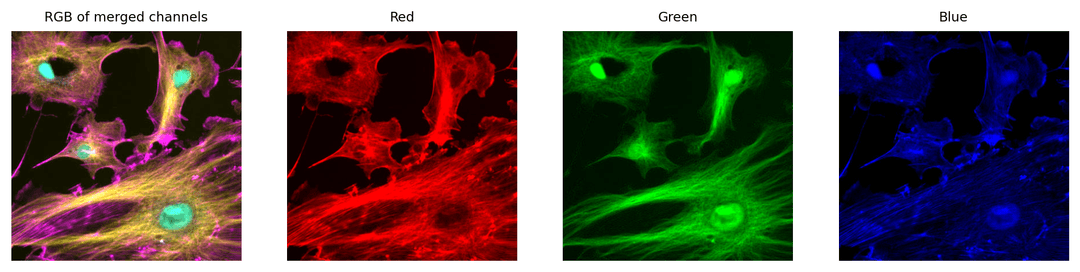
An RGB value of (255, 0, 0) gives us red, (0, 255, 0) gives us green, and (0, 0, 255) gives us blue. Surprisingly, an RGB value of (255, 255, 255) gives us pure white. This is because we are working with light from the computer screen rather than pigment from paint. This gives us additive color rather than subtractive color.
Why use RGB?
Why do we approximate the entire visible spectrum with three values?
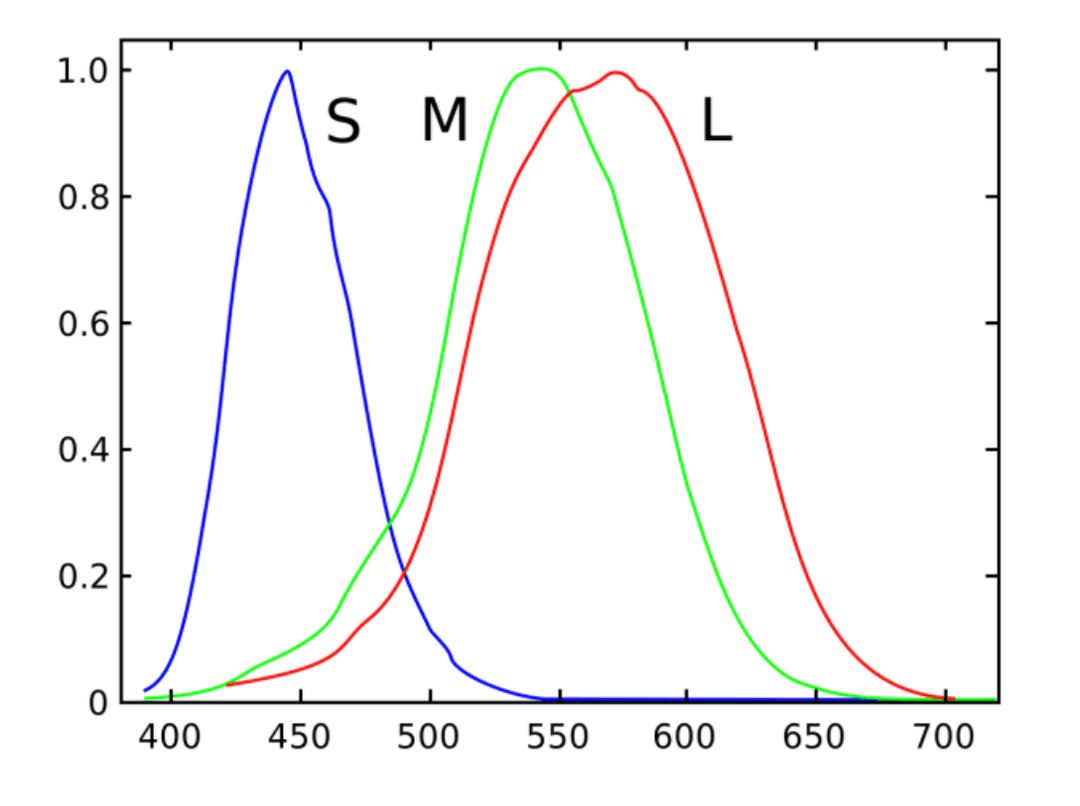
The human eye has three types of color receptors (cones) that are each sensitive to a different range of visible wavelengths. These are sometimes called red, blue, and green cones (or short, medium, and long cones).
Notice that the medium and long cones are pretty close to each other.
Datatypes and Memory
Notice that intensity is represented with a float64, while color is represented with a uint8. The reason we use uint8 for RGB images is that float64 takes up a lot of storage. If we used floats for RGBA images, each pixel would require 16 bytes, and a 1000 x 1000 image would take up 16 MB of memory.
Most displays today use 24-bit true color, which is 8 bits per color channel. Since each color channel has distinct values, we generate million different RGB colors.
Is this enough color?
The human eye can discriminate only around 10 million colors, so this is generally sufficient. However, humans are fairly good at noticing uneven changes in color in color banding, which can be undesirable.
There are multiple ways to store images in memory:
- Array of structs (AoS), where each struct represents an RGB value
- Struct of arrays (SoA), where each array represents a R, G, or B channel Different memory organizations affect cache locality.
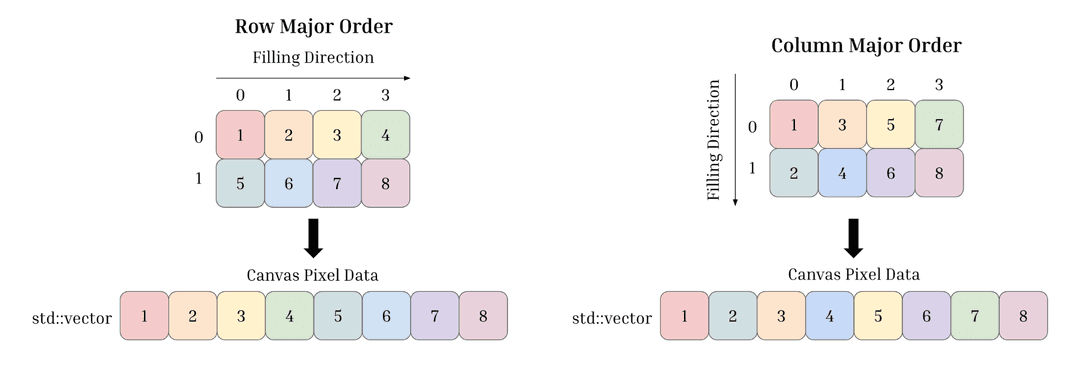
It is also common to store 2D arrays of data in 1D data structures. There are two common ways of doing this: (1) row-major ordering and (2) column-major ordering.
References:
Vector Graphics
Pipeline
To create a vector graphic:
- Define object geometry
- Transform object (translate, rotate, scale)
- Define "window" on the world
- Render into raster graphics
In each of the steps of this pipeline, there are many different coordinate systems:
- Object space is the local coordinate system in which a single object is defined
- World space is the global coordinate system for the scene
- Camera space is the coordinate system defined by the camera through which the scene is viewed
Why use multiple coordinate systems?
We want to keep different layers modular, so we can modify each independently. For example, we may want to scale or rotate individual objects. If all objects are defined in terms of world space, then there may not be a linear matrix transformation to do this.
Also, at higher levels of abstraction, we don't want to think about specific device coordinates to draw to. We may have to later consider the resolution of the device (normalized device coordinates) and the view plane of the OS window that the application runs in (screen space).
View Plane
A view volume contains everything the camera sees.
- A conical volume approximates what the eyes can see
- A frustrum is a rectangular pyramid which approximates the conical view volume
- A parallel volume doesn't stimulate the eye or camera
The 3D is projected onto the view plane sitting in world space. It should be perpendicular and centered around the look vector. It should also be located somewhere between the eye and the scene.
The parameters of the view volume are:
- Position
- Look vector
- Orientation (often represented by up vector)
- Aspect ratio
- View angle
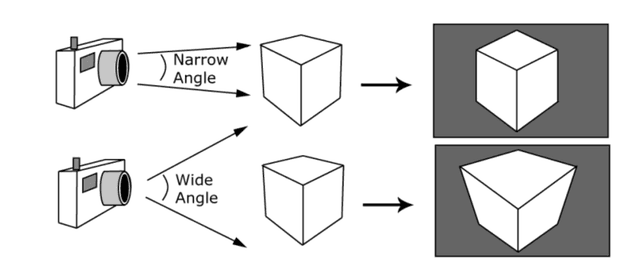
A view angle1 determines the amount of perspective distortion in the picture. It is equivalent to a photographer choosing a specific type of lens (e.g. wide-angle or telephoto lens). In a frustrum, there is both a height angle and a width angle.
Camera Space
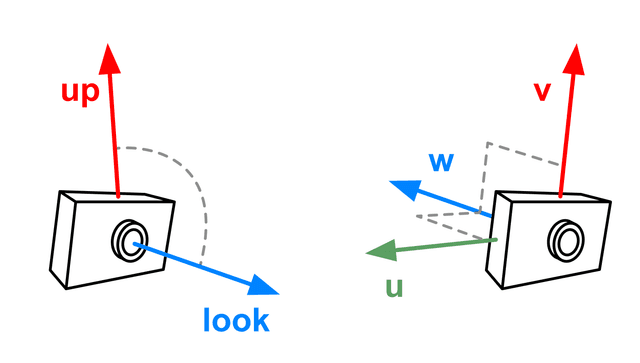
The position, look vector, and up vector are enough to define the camera coordinate system.2 The equivalent of , , and world coordinate axes in camera space are unit vectors , , and .
- is in the opposite direction of the look vector
- is the component of the up vector that is perpendicular to the look vector
- is the vector perpendicular to both and
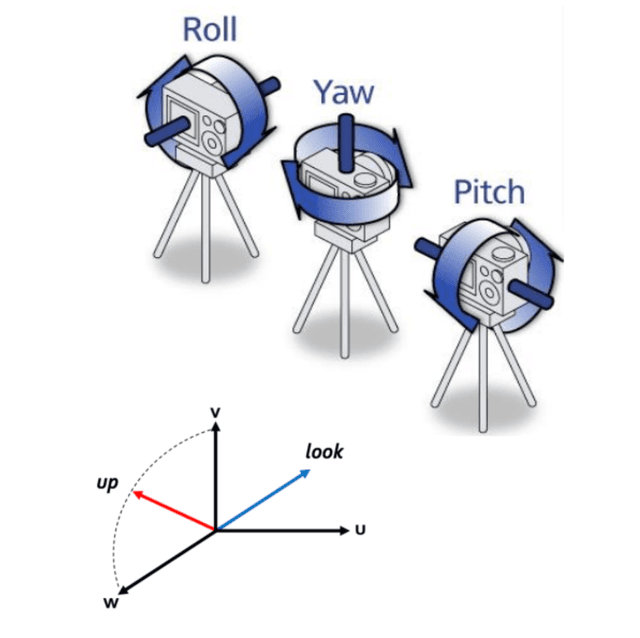
Having a camera coordinate system allows us to change the orientation3 of the camera:
- Roll: rotate camera around look
- Yaw: rotate camera around
- Pitch: rotate camera around
View Matrix
The canonical camera space is one where the camera sits at the origin, looks down at , and is oriented such that is up. The view matrix transforms objects from world space into camera space.
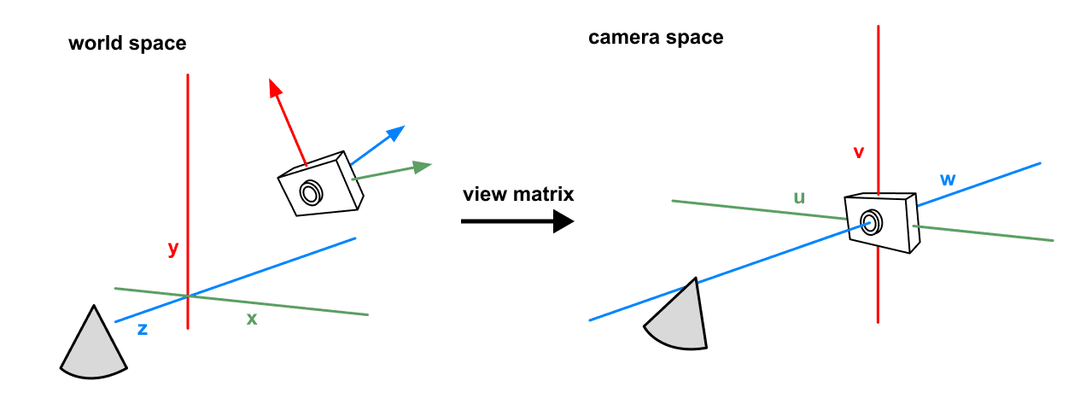
Suppose that the camera is in position in world space. The view matrix is made from a translation that moves the world by , followed by a rotation that aligns , , with , , .
Note that a matrix with columns [, , ] transforms the , , axes to , , directions. The inverse of does the opposite. As it turns out, because is a orthonormal matrix, the inverse of is just its transpose.
By putting the rotation and translation together, we get one matrix for transforming other objects into the camera's coordinate system.4
Scenes
Graphics applications typically represent scenes with a DAG which stores:
- Objects
- Attributes (color, texture)
- Transformations
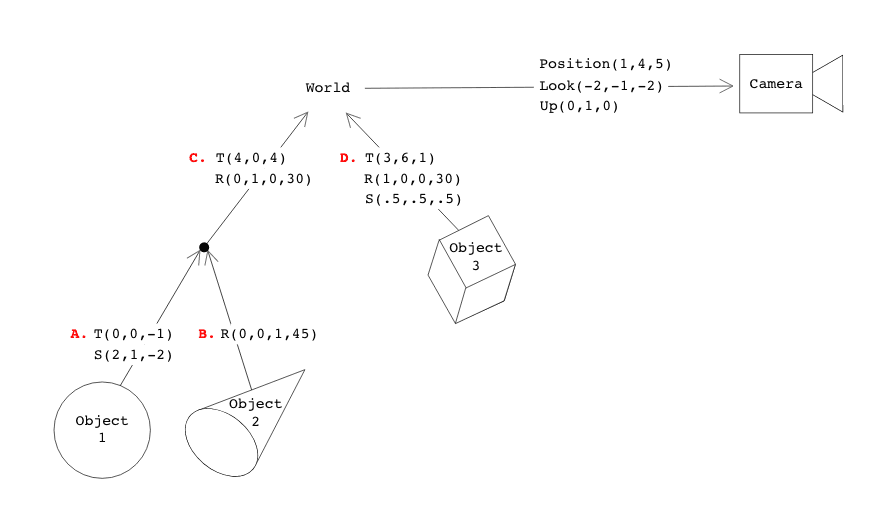
To get the cumulative transformation matrix of an object, simply multiply the transforms along the path from the object node to the root. For example, to transform Object 1 to world space, first apply transformation A then C.
Note that the equivalent CTM would be . Thus, it is fine to traverse down from the root node to the object nodes, keeping a running CTM by multiplying the current CTM with the node's CTM.
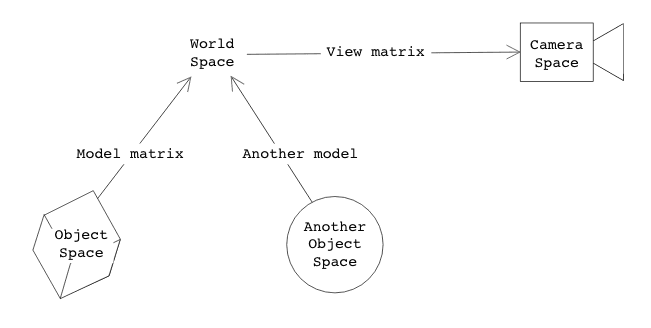
To generalize a bit, each of the vertices building pointing up to the world root are model matrices which transform the object from object space to world space. The final matrix is a view matrix that transforms any object from world space to camera space. The inverses of these matrices provide the transformation of the opposite direction.
Raytracing
Raytracing takes the 3D objects we see at each point in camera space and projects them onto a view plane.
For each pixel, we need to solve two problems:
- What object appears in the pixel?
- What color should the pixel be?
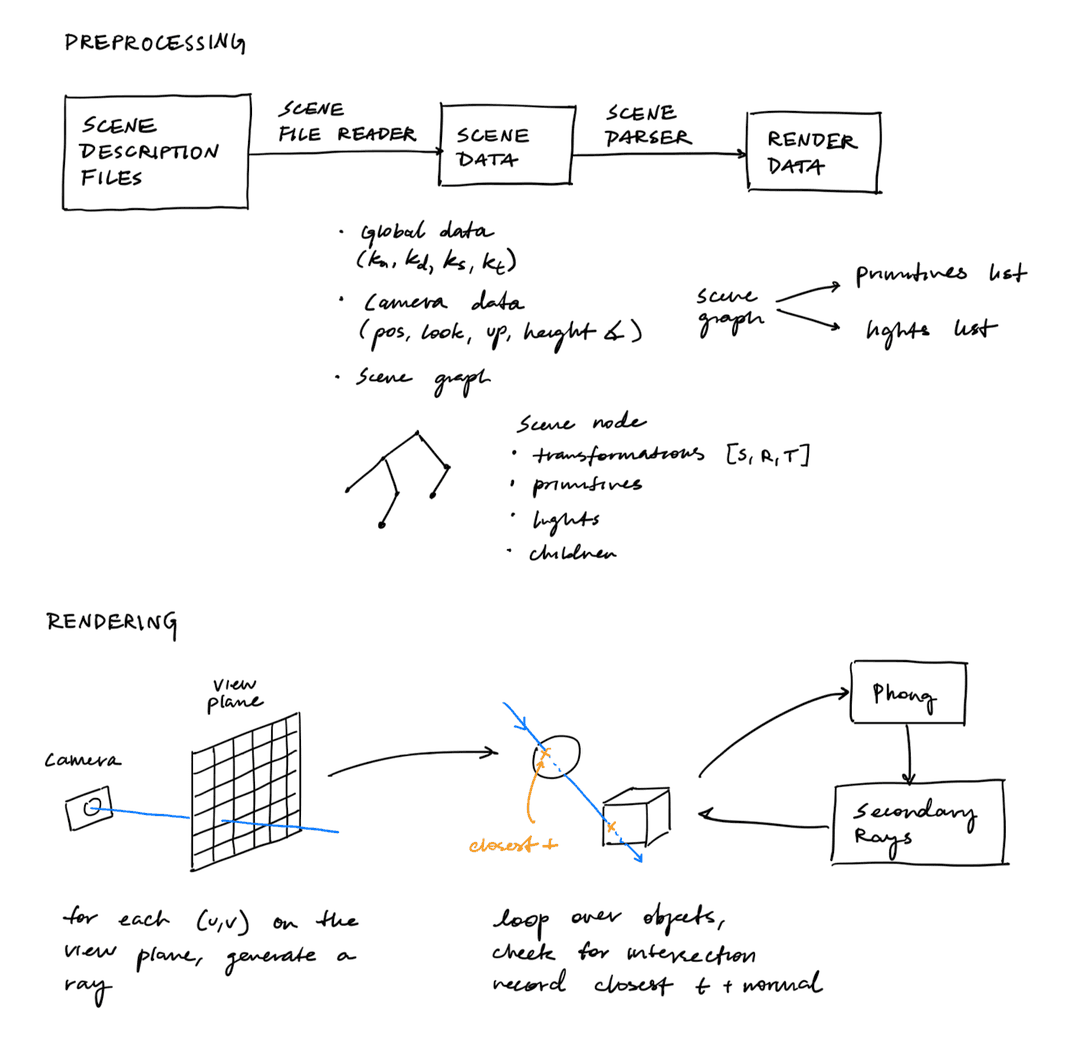
To determine what object appears in the pixel, we trace a ray from the camera, through the middle of the pixel, and solve for the first point of intersection in the scene.
There are two types of rays:
- Primary rays start from the camera and determine which parts of the scene are visible from the window.
- Secondary rays starts at points in the scene, where the primary rays hit, and are traced to other parts of the scene. They are used to compute light effects.
Primary Rays
A primary ray should take the form , where is the origin of the ray and is the direction vector.
should be set to the camera's coordinates in world space.
We can calculate in three steps:
- Given a coordinate of a pixel on the view plane, convert it into the corresponding 3D point on the view plane in camera space.
- Transform into world space using the inverse view matrix, creating .
- Then is simply .
The first step is given by
Each coordinate is first shifted so that it is centered on the pixel. Then it is normalized by the dimensions of the scene plane so that it becomes a one-by-one grid. Then it is shifted by so that the center of the grid is at the origin .
Finally, the and coordinates are scaled by the width or height of the view plane, or . The height and width of the view plane is given by the equations , where is the distance from the camera to the view plane and is the height or width angle.
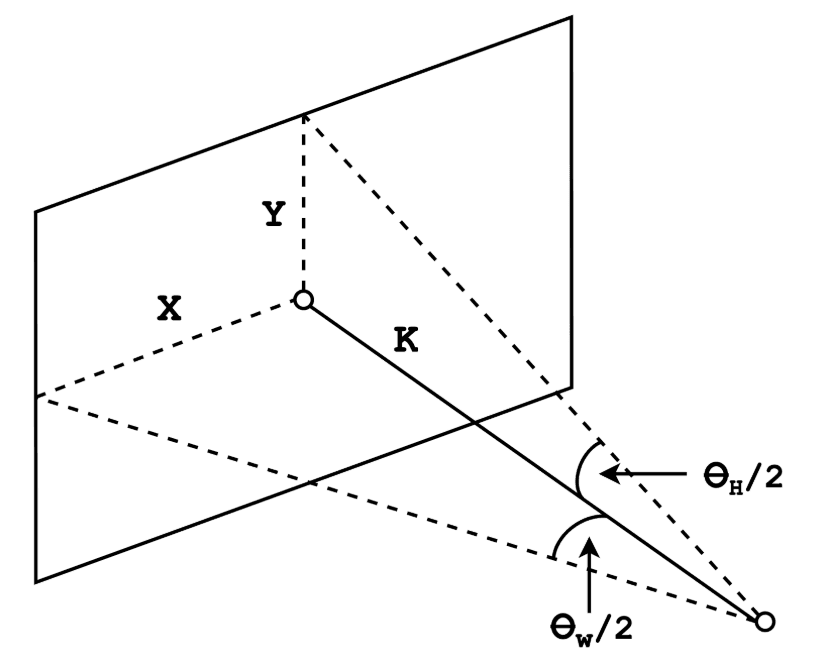
Since the view plane sits at in camera space, and is usually set to , this gives us a full 3D point in camera space.
The inverse view matrix can be computed by taking the inverse of the view matrix, as described above in the View Matrix section.
Ray-Object Intersections
Ray-object intersections can easily be calculated with implicit objects.5 An implicit object is an object that can be definited by a function , where iff is a point on the service.
To find where a ray intersects an object, we just need to solve6 for the values of 7 such that .
Cubes
Consider a unit cube of side length sitting at the origin .
To determine whether a ray intersects with this cube, we should check whether it intercepts with any of its six faces:
- If the ray is parallel to the face's plane, then there is no intersection
- If there exists some point that intersects with one of the infinite planes, then there may be an intersection
- If that point also lands within the bounds of the face, then it actually intercepts with the cube
Cube Intersection Calculations
An infinite plane with a normal vector that is distance away from is defined by all points satisfying:
A unit cube can be described as six bounded planes whose normals are the unit vectors along each axis, pointing outward:
To check for ray-plane parallelism, we should check whether the normal is perpendicular to the direction vector, i.e. that .
To check for ray-plane intersection, we want to find some such that satisfies the plane equation .
By definition, this is equivalent to .
The dot product is distributive, so we can derive: .
Finally, we need to check that the point falls within on all axes.
Cylinders
Consider a cylinder of radius , spanning from . A cylinder can be conceptualized as a circle in the xz plane that is stretched along the y-axis.
To check if a ray intersects with a cylinder, we should check whether it intersects with the side of the cylinder or with either of the two end caps:
- For the side, solve a quadratic for , then discard roots where or where the hit's falls outside
- For each cap, intersect the ray with the plane or , then check that the hit point falls within the cylinder's radius
Cylinder Intersection Calculations
The side of the cylinder is the set of points satisfying:
Substituting the ray for and collecting terms by power of gives a quadratic , where:
The quadratic formula gives up to two roots for . For each root, we discard it if or if the resulting falls outside , since that means the hit lands above or below the finite cylinder.
The surface normal at a hit point is the gradient of , which is . This normalizes to the same direction as , so we can use the hit point directly, with its coordinate zeroed out.
For each cap, we find where the ray intersects with the plane , which is given by , or .
We then check that the hit point at time lands within the disk .
The normal is for the top cap at , and for the bottom cap at .
Cones
Consider a cone with an apex at and a base radius of at .
To check if a ray intersects with a cone, we should check whether it intersects with the side of the cone or with the base disk:
- For the side, solve a quadratic for , then discard roots where or where the hit's falls outside
- For the base, intersect the ray with the plane , then check that the hit point falls within the base's radius
Cone Intersection Calculations
The cone's radius shrinks linearly from to from the base at to the apex at . The radius at height is thus
The side of the cone is the set of points satisfying:
Expanding the right side and moving everything to one side gives the implicit function:
Substituting the ray for and collecting terms by power of gives a quadratic , where:
The quadratic formula gives up to two roots for . For each root, we discard it if or if the resulting falls outside , since that means the hit lands above or below the finite cone.
The surface normal at a hit point is the gradient of :
which points in the same direction as the halved vector , so we can normalize that instead.
For the base, we find where the ray intersects with the plane , which is given by , or .
We then check that the hit point at time lands within the disk .
The normal there is always , pointing straight down.
Spheres
Consider a sphere of radius at the origin. A sphere of radius at the origin has the equation:
To check if a ray intersects with a sphere, we solve a quadratic for , then take the smallest non-negative root. Unlike the cube, cylinder, and cone, there are no bounds to check and no separate cap surfaces, since the sphere's implicit equation already describes a closed surface.
Sphere Intersection Calculations
Substituting the ray for gives:
Distributing the dot product and collecting terms by power of gives a quadratic , where:
The quadratic formula gives up to two roots, . We want the smallest non-negative root, since that is the closest intersection in front of the ray origin:
- If , use
- Otherwise, if , use
- Otherwise, both roots are behind the ray origin, so there is no intersection
The surface normal at a hit point is the gradient of , which is . This normalizes to the same direction as the hit point itself, so we can just normalize the hit point directly.
Lighting
Lighting is the simulation of how light interacts with objects. Because accurately simulating lighting is very hard, we usually used simplified lighting models.
Direct illumination is light striking a surface directly from a light source. Indirect illumination light bouncing off other objects toward the surface element. It is a much more difficult to simulate than direct illumination, but we can often approximate indirect illumination with direct illumination.
Light Sources
In graphics, there are three common models of light sources:
| Type | Description | Parameters |
|---|---|---|
| Point light | A point that emits light equally in all directions | Position and light intensity |
| Spot light | A point that emits light in a finite cone of directions | Position , light intesity , light direction , and cutoff angle |
| Directional light | A light that shines in a particular direction; good for modeling the sun | Direction and light intensity |
Light Attenuation
Light attenuation is the idea that the amount of light illuminating an object should decrease with the square of distance. Thus, to be physically correct, when lighting a point that is distance away from a light source with intensity , we should attenuate the intensity as .
The problem is that this produces a very harsh lighting effect because there is no indirect illumination. Instead, we can use this hack:
Where , , and are experimentally defined constants.
Surface Normal Vectors
For illumination, we want to find the normal vector at the point . We can find this normal vector by taking the gradient at that point:
Once we have calculated the normal vector in object space, we need to transform the normal vector into world space.
Note that we cannot just apply the transformation matrix because when there is scaling. Scaling distorts the normal in exactly the opposite sense of scale applied to a surface. For example, scaling by a factor of causes the normal to scale by .
The right equation is , unless the transformation includes a reflection (i.e. ). The most foolproof equation is
BRDFs
Give a surface normal , an incoming light direction , and an outgoing light direction , the bidirectional reflectance distribution function (BRDF) describes how much incoming light is scattered in that outgoing direction:
Some common types of BRDFs are:
- Lambertian (diffuse): light scatters equally in all directions
- Specular (glossy): light scatters more tightly around one direction
- Mirror
The name of the Lambertian BRDF comes from Lambert's cosine law, which states that light intensity falls off with the cosine of the angle between and : .
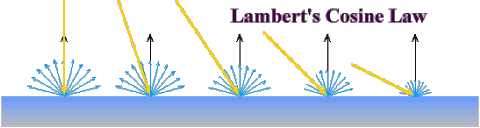
Given as an RGB color, this gives us the Lambertian BRDF:
Most materials are not perfectly Lambertian; most BRDFs are viewer dependent. This is where specular BRDFs. One of the most common Specular BRDFs is Phong BRDF:
where:
- is an RGB color
- is the vector to the viewer
- is the angle between and
- controls how tight the specular highlight is
Phong Illumination Model
The Phong illumination model combines what we know about modeling light sources and materials to define a way to light objects.
First, it breaks lighting into three components:
- Ambient stands in for the effect of indirect light; it affects all surfaces equally
- Diffuse is the effect of direct light on a surface with a dull or rough finish
- Specular is the effect of direct light on a shiny surface when the vector to the eye is closely aligned to the light's reflected rays
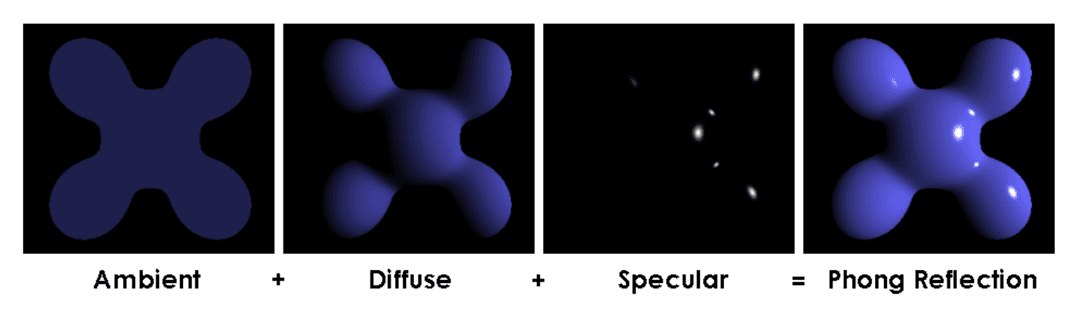
The Phong illumination model has three terms:
Putting together the BRDFs for diffuse and specular reflection with light attenuation, the full equation, evaluated separately for each color channel , is:
where:
- is the ambient term
- is the attenuation factor8
- is the intensity of light
- is the diffuse term created by the Lambertian BRDF9
- is the specular term created by the the Phong BRDF10
Here is a list of coefficients:
- is a model parameter
- is a material property
- is the unit direction from the point to the light
- is the reflection of about
- is the unit direction from the point to the camera
- is the shininess, a material property controlling how tight the specular highlight is
Note that the attenuation factor only multiplies the diffuse and specular terms, not the ambient term, since ambient light isn't coming from any particular light source's position. Directional lights have no position and therefore no attenuation (see Light Sources).
Note that the normal should point toward the viewer. You should check the dot product of normal with the view direction and flip the normal if it is negative.
Shading
We have to compute color for every pixel in our output image, but we don't necessarily have to evaluate the full Phong illumination equation at every equation.
Graphics systems often make the distinction between:
- Lighting: what illumination model is evaluated and at what points
- Shading: how every pixel is colored based on the lighting evaluations
This is mostly relevant for real-time graphics, with objects made out of polygons. With implicit objects, we usually just evaluate the exact equation at each pixel where an intersection occurs.
Common shaders include:
- Flat shading: compute the normal (and lighting) once per face and apply that single color to all pixels in it
- Gouraud shading: compute lighting at each vertex using the vertex normal, then linearly interpolate the resulting colors across the face
- Phong shading: interpolate the normals themselves across the face, then run the lighting calculation per pixel using the interpolated normal
References:
Whitted Raytracing
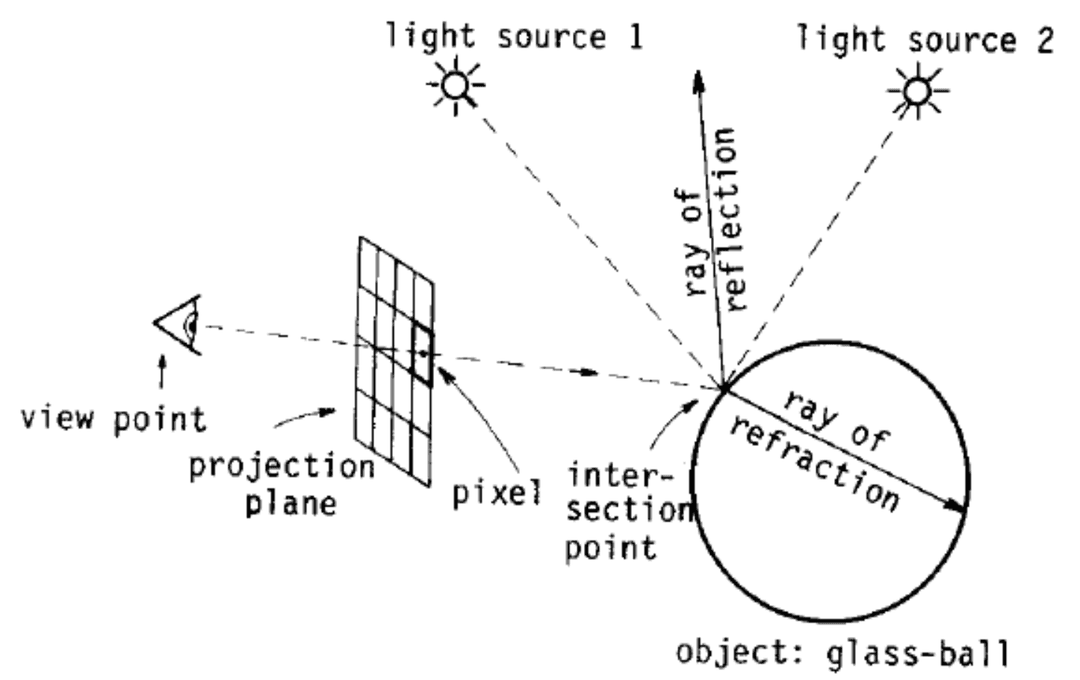
There are some lighting effects that are not captured by Phong illumination, such as shadows, reflection, and refraction.11 Turner Whitted introduced a recursive ray-tracing algorithm to capture these elements using shadow rays, rays of reflection, and rays of refraction.
Shadow Rays
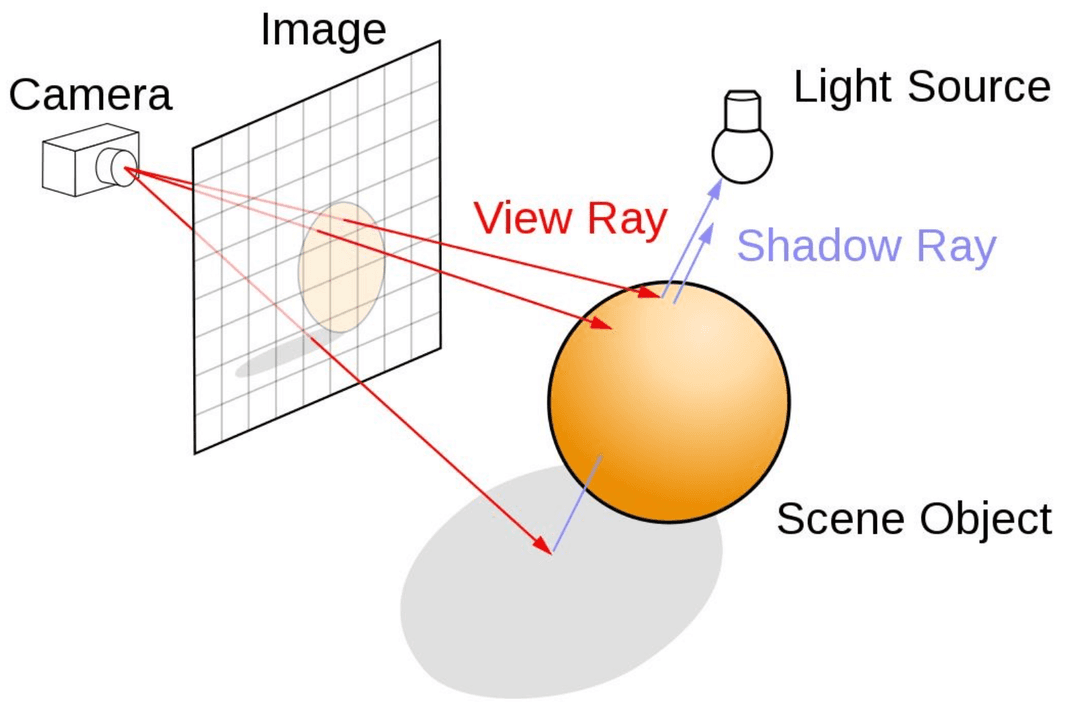
To create shadows, we should shoot a "shadow ray" from the scene element12 to the light source, and check if it is blocked by any other element in the scene.
If it is blocked, then do not allow the light to contribute a specular and diffuse term.13
Reflection and Refraction
At each intersection with a surface, we perform raytracing again from that intersection point:
- For a reflective surface, we trace the reflection ray about the normal vector at the surface intersection
- For a refractive surface, we trace the refraction ray following Snell's law
We then add the color returned by that recursive call to the color of our intersection point, scaled by a material parameter or . We continue recursively spawning new rays until the contribution is negligible or maximum recursive depth is reached.14
Reflection Calculations
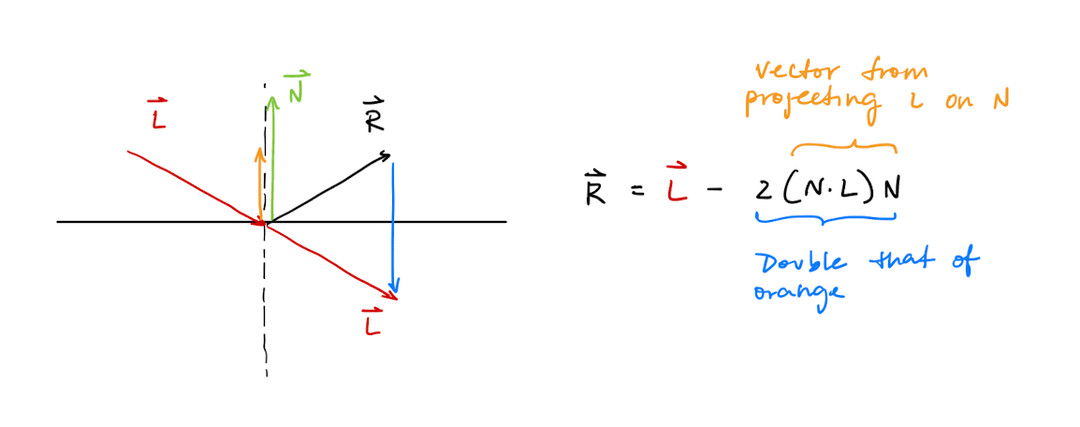
Given an incident ray direction pointing into the surface and a unit normal , decompose into a component along and a component tangent to the surface. Reflection keeps the tangential component and flips the normal component:
Refraction Calculations
Let be the incident ray direction, the surface normal oriented against , and the ratio of refractive indices. Then .
Snell's law states that
Dividing both sides by gives . Squaring both sides and substituting gives:
If , no real satisfies this equation.
Otherwise, .
To find the transmitted ray as a vector, decompose into a component along and a component tangent to the surface. Since , the projection of onto is , so:
The sines in Snell's law are exactly the tangential components of these unit vectors, so the transmitted ray's tangential component is the incident ray's tangential component scaled by :
The transmitted ray's normal component points further into the surface, the same way 's does, with magnitude :
Adding these components together and simplifying gives the full transmitted ray:
Extended Illumination Equation
Putting it together, this gives us the extended illumination equation:
where:
- is if the light ray is blocked and if the light ray is not blocked
- is the color returned by tracing a recursive ray reflected about the surface normal
- is the color returned by tracing a transmitted ray through the surface
- is the material transmission efficiency
References: An improved illumination model for shaded display by Turner Whitted
Distributed Raytracing
Distributed raytracing15 extends Whitted raytracing by distributing ray samples across multiple domains, rather than tracing a single ray per sample point.
- To achieve supersampling and antialiasing, multiple rays are shot through a single pixel into the scene.
- To achieve motion blur, multiple rays are shot across time.
- To achieve depth of field and defocus blur, multiple rays are shot through an area of the lens instead of just a point.
- To achieve soft shadows,16 glossy reflections, and translucency, multiple rays are shot across an area.
Raytracing Pipeline
The full raytracing pipeline is as follows:
Spatial Data Structures
The native ray tracing algorithm has a time complexity of O(MN), where M is the number of pixels and N is the number of objects. To reduce the time complexity, let's look at the O(N) part.
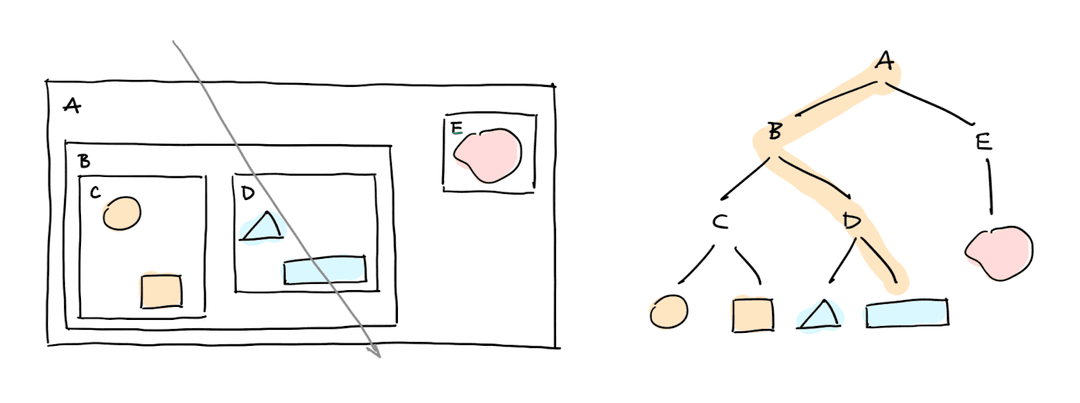
Bounding Volume Hierarchies
A bounding volume is a data structure that encloses complex objects in simpler ones. If the bounding volume isn't hit, then neither is the object inside it.
An axis aligned bounding box (AABB) is a cuboid where each edge is parallel to either the x, y, or z axis. This is convenient because we can uniquely represent the cuboid as its min and max values of x, y, and z.
A bounding volume hierarchy (BVH) arranges the bounding volumes in a hierarchical structure. There are two main approaches to building BVHs:
- Find nearby objects, group them under one bounding volume. Repeat until the entire scene is under one bounding volume.17
- Start with all objects in the scene, and split them into subsets using some kind of heuristic.18
Spatial Subdivisions
We can also break up space into uniform cells, and trace the ray through each cell. Compared to BVH, it takes more traversal time19 but less construction time.
We can also construct nonuniform, hierarchical cells called octrees. In an octant, each node is a AABB.
To construct an octree:
- Find the bounding box of the entire scene
- At each iteraction, partition the current node into 8 octants
- Split the primitives at the current node into the octants. If a primitive spans both octants, put it in both.
- Recurse on the octants.
- Terminate on some maximum depth or maximum objects per octant
To traverse an octree:
- Begin at the root node
- If the node is a leaf node, test interaction with all of its primitives20
- Otherwise iterate through the node's children21 and compute intersection between ray and each child's bounding box. If it intersects, recurse on the child again.
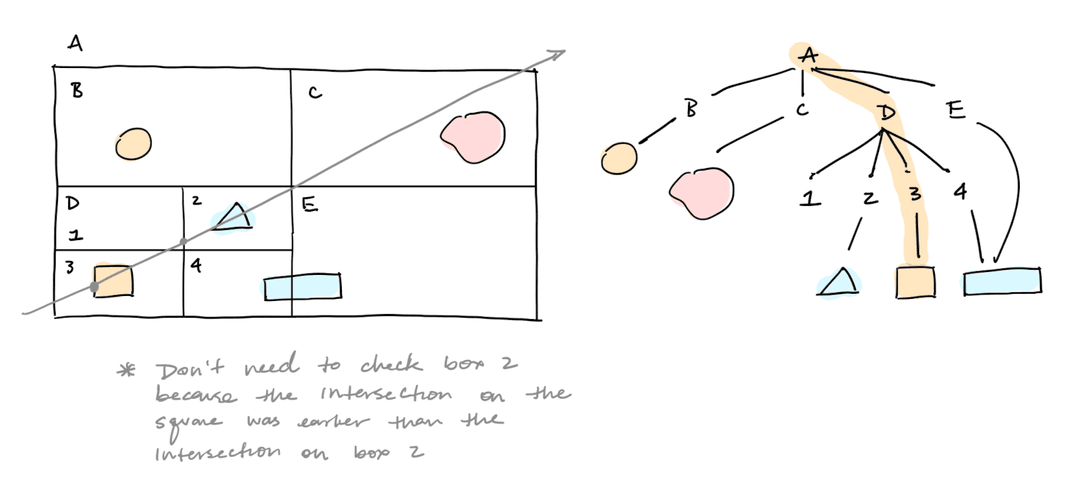
A kd-tree is a k-dimensional, axis-aligned binary tree. The benefit of a kd-tree over an octree is that we can be smarter about determining the size of nodes in the tree.22
The main challenge is to decide on a split axis and split plane along the axis. Ideally, we'd like to balance the cost of entering a node (# of intersection tests) with the probability of entering the node.
This is an NP-complete problem, but a nice heuristic is the surface area heuristic:
- For each split position,23 calculate the cost
cost = weight_l * cost_l + weight_r * cost_r24 - Use the split plane that minimizes this cost
The naive cost of constructing the kd-tree is because for each of split planes, we need to check primitives to determine which side they are on. But if we sort the primitives along the split axis, we can achieve more of a .
Summary
| Structure | Build time | Traversal time | Good for dynamic scenes | Good for nonuniform density |
|---|---|---|---|---|
| BVH | Slow, | Good, it is a trie structure | Good, can adapt to clusters | |
| Uniform grid | Fast, | but typically faster | Great, cheap to rebuild since cells are fixed | Not good, empty or overcrowded cells waste work |
| Octree | Moderate, | Less good, objects can move between octants | Not good, can't adapt to clusters | |
| Kd-tree | Slow, naive, with sorting | Terrible, need to rebalance trees | Good, split planes can balance primitives |
Texture Mapping
Other than shading, we may also want to add texture to an object. One way to do this is with texture mapping.
Pros of texture maps:
- Can be stored once and reused
- Can be easily compressed to reduce size
- Can be rendered quickly
- Fairly intuitive to work with for artists
- Can be used for far-away objects (billboarding)
Cons of texture maps:
- Surfaces still look smooth because geometry is unchanged
Texture mapping has two subproblems:
- Surface parameterization: mapping the 3D surface to a 2D plane (UV plane)
- Texturing: assigning a value to each point on the UV plane
There are two main types of texturing:
- Image texturing: use to index into an image
- Procedural texturing: use as input to some function which computes the texture
Surface Parameterization
The goal of surface parameterization is to find25 a function which describes the surface.
Certain 3D shapes are naturally defined by a parametric function, such as cubes, cylinders, cones, and spheres. In each case, we want a function that takes a point26 on the surface and returns .
Cubes
Consider a unit cube spanning .
To find the UV coordinate of a point on a cube, given its normal :
- Use the sign of each component of to determine which of the six faces lies on
- Map the two coordinates of that aren't fixed by linearly into , negating one where needed to keep the texture consistently oriented across faces
Drag the point around the shape below to see where it lands in the UV square. The checkerboard is the texture, drawn on the surface through the parameterization itself.
Cube UV Mapping Calculations
Consider a point on the face whose normal points along (i.e. ). The other two coordinates, and , each range over and map directly and linearly into :
Each coordinate is shifted by to map it from into . Some coordinates are also negated before shifting to keep the texture's orientation consistent across faces.
Cylinders
Consider a unit cylinder of radius , spanning .
To find the UV coordinate of a point on a cylinder, given its normal :
- If , is on a cap. Map 's and coordinates directly onto .
- Otherwise, is on the side. Find the angle around the circle and map it to , then normalize the height to get .
Cylinder UV Mapping Calculations
For the top cap ():
For the bottom cap ():
For the side, atan produces a in the range , which could map two perimeter positions to the same value. To fix that, use atan2, which produces a in the range :
To map to :
- If ,
- If ,
These two cases agree at , where both give , and disagree at , where wraps from back to . So the seam lands on the meridian.
Since the cylinder spans , the height maps directly into by shifting:
Cones
Consider a unit cone with apex at and base radius at . Unlike the cylinder, the cone's side doesn't have a single normal direction, so the normal alone can't distinguish the base from the apex. Instead, we check the normal for the base, and the point's height for the apex.
To find the UV coordinate of a point on a cone, given its normal :
- If , is on the base. Map 's and coordinates into , the same way as the cylinder's bottom cap.
- Otherwise, if , is at the apex. Every value of maps to the same point there, so defaults to a fixed value, .
- Otherwise, is on the side. Find and the same way as a cylinder, and let .
Spheres
Consider a unit sphere of radius at the origin.
To find the UV coordinate of a point on a sphere:
- Find the latitude angle of , then normalize it into
- If , is at a pole, where every value of maps to the same point, so defaults to
- Otherwise, find the same way as a cylinder to get
Sphere UV Mapping Calculations
The latitude angle of a point at height on a sphere of radius is:
This maps to by:
At (south pole) and (north pole), is undefined, so defaults to there instead of being computed.
Meshes
An arbitrary polygonal mesh has no closed-form parametric function, so UV coordinates must instead be assigned explicitly, as a pair stored at each vertex alongside its position and normal. There are several approaches to choosing these values:
- Texture each face independently
- Planar, spherical, or cylindrical mapping
- Manual UV mapping
In manual UV mapping, the artist cuts seams into the object to unfold it into UV space. Seams are placed on portions of the model that are less visible or sections that could have discontinuities.
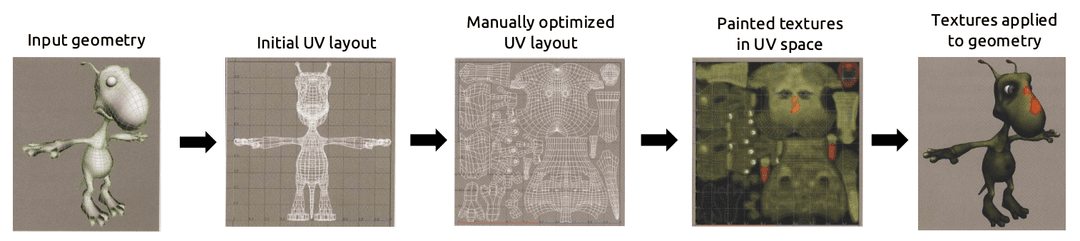
Once each vertex of a triangle has a value, the for any point inside the triangle is found by interpolating the three vertex values, using the same barycentric-coordinate technique used to interpolate colors below. This is what lets a texture stretch smoothly across a triangle instead of being constant per-face.
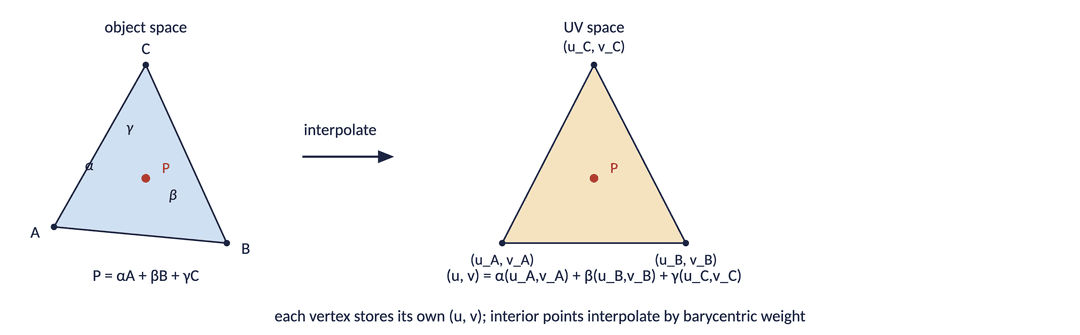
If we can find the color on every vertex of the object, then we can find the color for any point on the surface.
First, let's consider interpolating between two values along a line. Given two colors and , we can compute any value along the line by evaluating
and are the barycentric coordinates of the line segment. This technique can be generalized for triangles.
Image Texturing
In most cases, the image coordinates will be different from texture (UV) coordinates. Suppose that the image has a width and height , and the UV plane is the unit plane. Then the mapping is:
For periodic textures (like brick), a better option for filling a piece of geometry is to tile the texture. Suppose that we have an image with width and height , and we want to repeat this image times horizontally and times vertically on the unit UV place. Then the mapping is:
Procedural Texturing
Procedural noise is used to create randomized data. A few examples of noise functions include white noise, value noise, perlin noise, simplex noise, and worley noise.
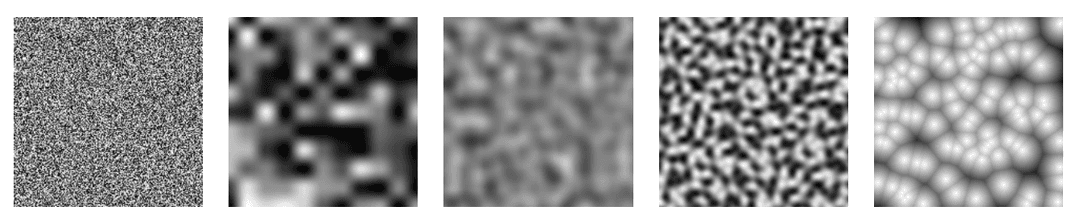
White noise:
- Every pixel is given a random value independent of its neighbors
- It is easy to implement and very fast
- It may be "too noisy" or too discontinuous for certain use cases
Value noise:
- Generate a grid of white noise values, then scale it up
- It is fairly easy to implement, pretty fast, and locally continuous
- The resulting noise is visibly aligned to the pixel grid
Perlin noise:
- Intensity is a function of a grid of vectors instead of a grid of values
- It is locally continuous and looks more organic
- It is more challenging to implement and can be very inefficient if implemented poorly
An easing function has the following properties:
ease(0)is 0ease(1)is 1ease(x)is continuous
References: CSCI 1230 Lab 5: Terrain
Antialiasing
All images begin as a continuous signal. When a photograph is taken, this continuous signal is turned into a discrete signal in a process called sampling. Values stored in discrete image pixels are point samples of the original continuous signal.27 Later on, the discrete signal can be reconstructed into a continuous signal.
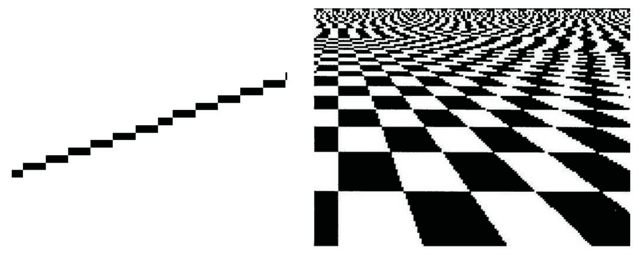
When we undersample a high-frequency signal, leading to an incorrect reconstruction with a low-frequency signal, this is called aliasing. Aliasing can cause issues like jaggies28 and crawlies.
We can avoid aliasing by taking some techniques from digital image processing.
Digital Image Processing
Digital image processing is the processing of images through algorithms in order to modify them or extract useful information from them. Their applications include noise removal, feature extraction, image compression, and image enhancement.
Digital image processing is really just a form of signal processing. A digital image can be viewed as a discrete 2D signal which maps a 2D coordinate to a pixel value. This gives us two ways to represent the same image:
-
In the spatial domain, the function represents the value at each coordinate .
-
In the frequency domain, represents the image as a sum of 2D sinusoids. Here and are spatial frequencies (cycles per unit distance) along and . Low frequencies correspond to coarse, slowly-varying features, while high frequencies correspond to fine detail and edges.
We get from with the Fourier transform.
The Nyquist Limit
The Nyquist limit says that we can avoid aliasing only if we sample at more than twice the highest frequency present in the signal. This gives us two solutions to avoid aliasing:
- Raise the sample rate until it clears the signal's highest frequency. This is called supersampling.
- Lower the signal's highest frequency until it fits under a sample rate we can afford. This is called prefiltering.
Note that a discontinuous signal has infinite frequency, so it is not always possible to satisfy the Nyquist limit by supersampling.
- For geometry edges and shadow boundaries, we don't know where the discontinuity falls until we render, so we supersample.
- For textures we have the entire signal on disk before rendering starts, so we can prefilter.
Supersampling
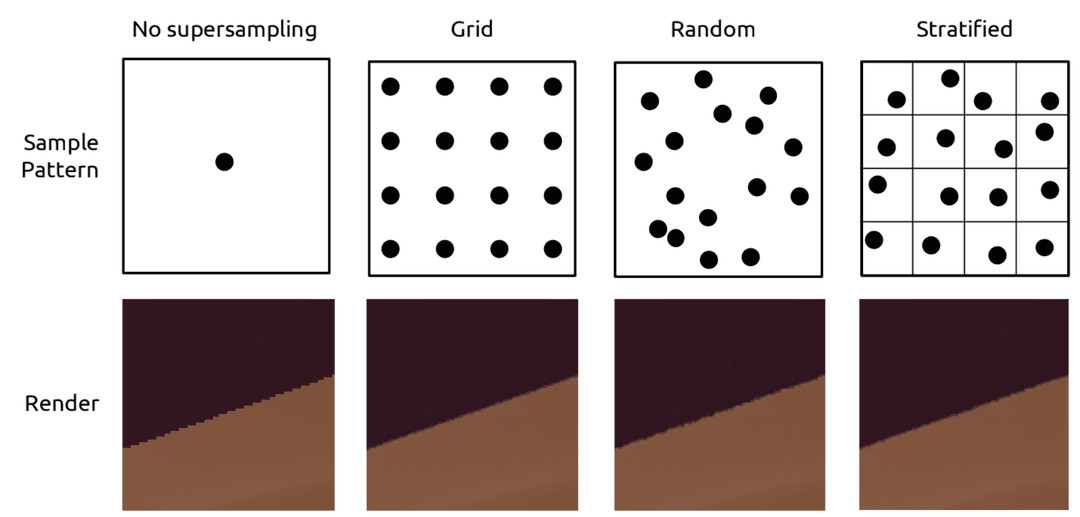
In supersampling, we sample at multiple places per pixel,29 and then we combine these samples to get one final color for the pixel. This does not eliminate aliasing on edges, but it pushes the aliased frequencies high enough that the artifacts become small.
How should we distribute our samples for a pixel?
- Regular grid sampling can still produce the stair-stepping artifacts (jaggies)
- Random sampling can produce noisy artifacts
- Stratified random sampling tries to combine the best of both worlds
How many samples per pixel should we use?
- Adaptive sampling schemes send out a small number of rays to check how much variation in color there is and check if more rays is warranted
How should we combine the samples to get the final color for the pixel?
- Average the values of the samples
Supersampling a pixel is one case of a more general idea: distributed raytracing spreads samples across time, lens area, and light area as well as across the pixel.
Prefiltering
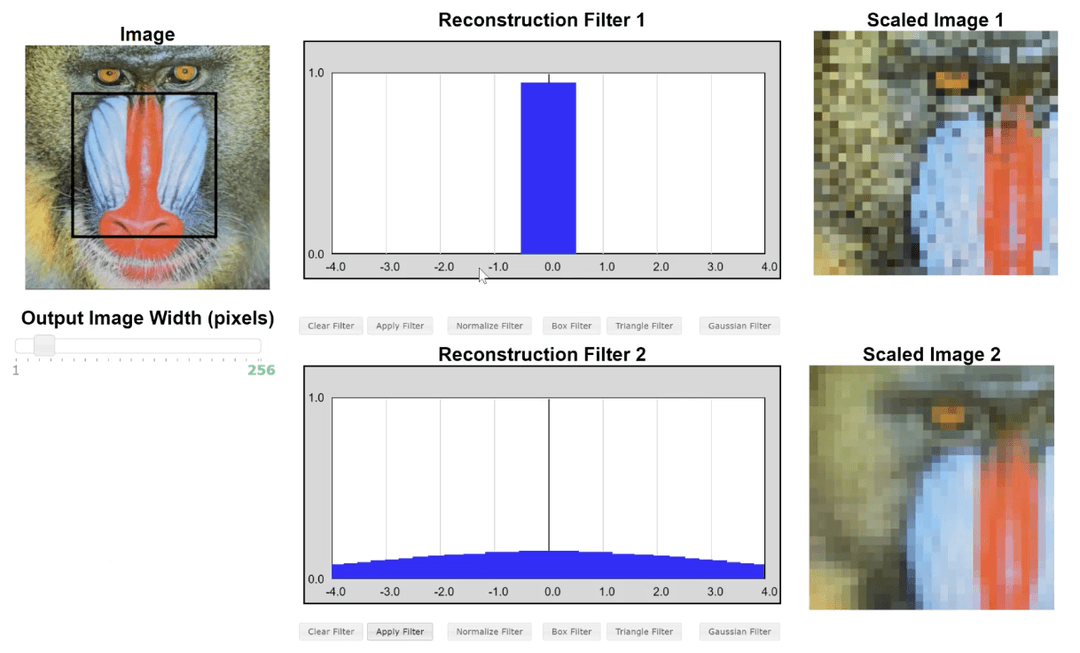
Prefiltering limits the signal, so that the frequencies we cannot represent are removed from the image. A low-pass filter keeps frequencies below some cutoff and discards everything above it.
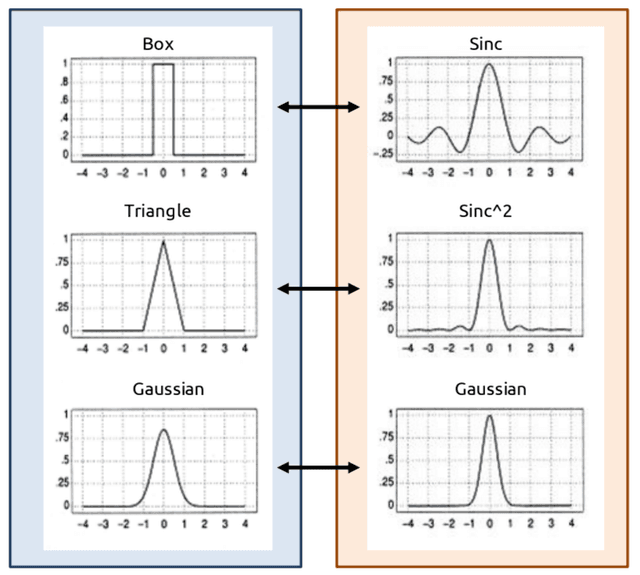
In the frequency domain, a low-pass filter is just multiplication of the power spectrum by a unit box function.
Multiplication in the frequency domain is convolution in the spatial domain, so in practice we implement one as a convolution of the image with a blur kernel.30
- A box in the frequency domain is the ideal low-pass filter, but its dual in the spatial domain is , a continuous, oscillating function that is difficult to truncate.
- The triangle filter is the linear interpolation function. The dual of the triangle filter is , since a triangle is a box convolved with itself.
- The dual of the Gaussian filter is another Gaussian function. It is usually preferred over the box filter because the Gaussian decays exponentially, so it is easy to truncate.
Texture Filtering
Prefiltering is especially useful for textures because we have the entire original signal.
When we shade a pixel, that pixel maps to some region of texture space. There are two cases that we could face:
- Magnification: The pixel maps to less than one texel, and we are sampling the texture faster than it has detail. There is no aliasing, but there may be poor reconstruction.
- Minification: The pixel maps to many texels, and we are sampling slower than the texture's detail. This causes undersampling and aliasing.
Magnification is a reconstruction problem, and minification is an aliasing problem. They need different fixes.
Bilinear Filtering
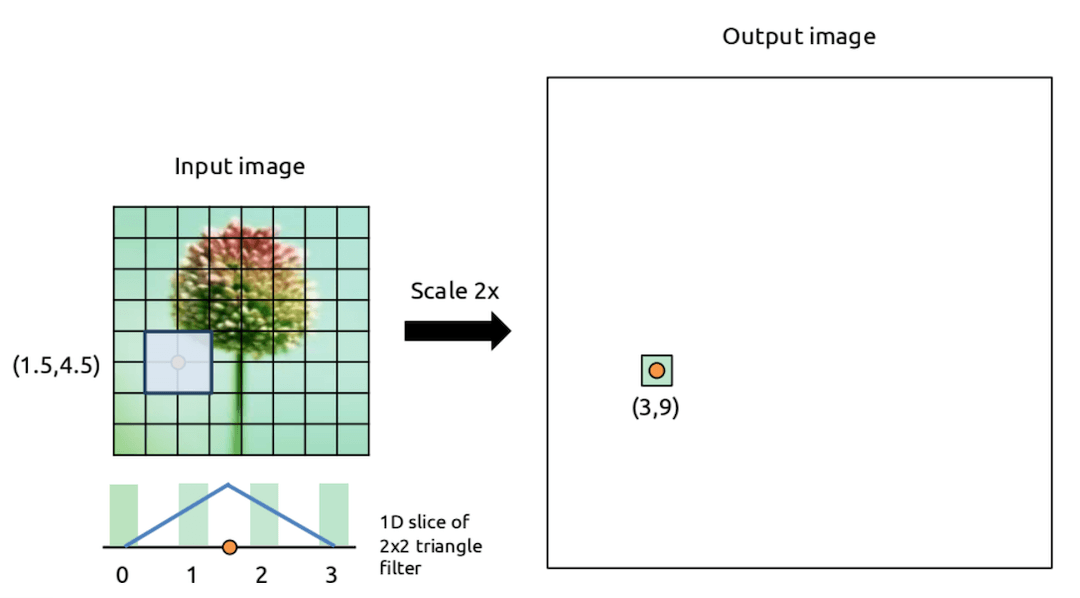
Bilinear filtering fixes magnification. The sample point almost never lands exactly on a texel center, so we find the four texels surrounding it and interpolate between them instead of snapping to the nearest one.
Let be the fractional position of the sample point within the square formed by those four texels, and let be their colors. Then bilinear filtering is two lerps along one axis followed by one lerp along the other:
Mipmapping
Texture pre-filtering fixes minification. Ahead of time we build a mipmap,31 a chain of successively halved, low-pass-filtered copies of the texture. At render time we measure how many texels the pixel covers, pick the level whose texels are about that size, and sample the texture.
We have two problems we need to solve:
- How do we measure how many texels the pixel covers?
- How do we determine the mip level from the texel coverage?
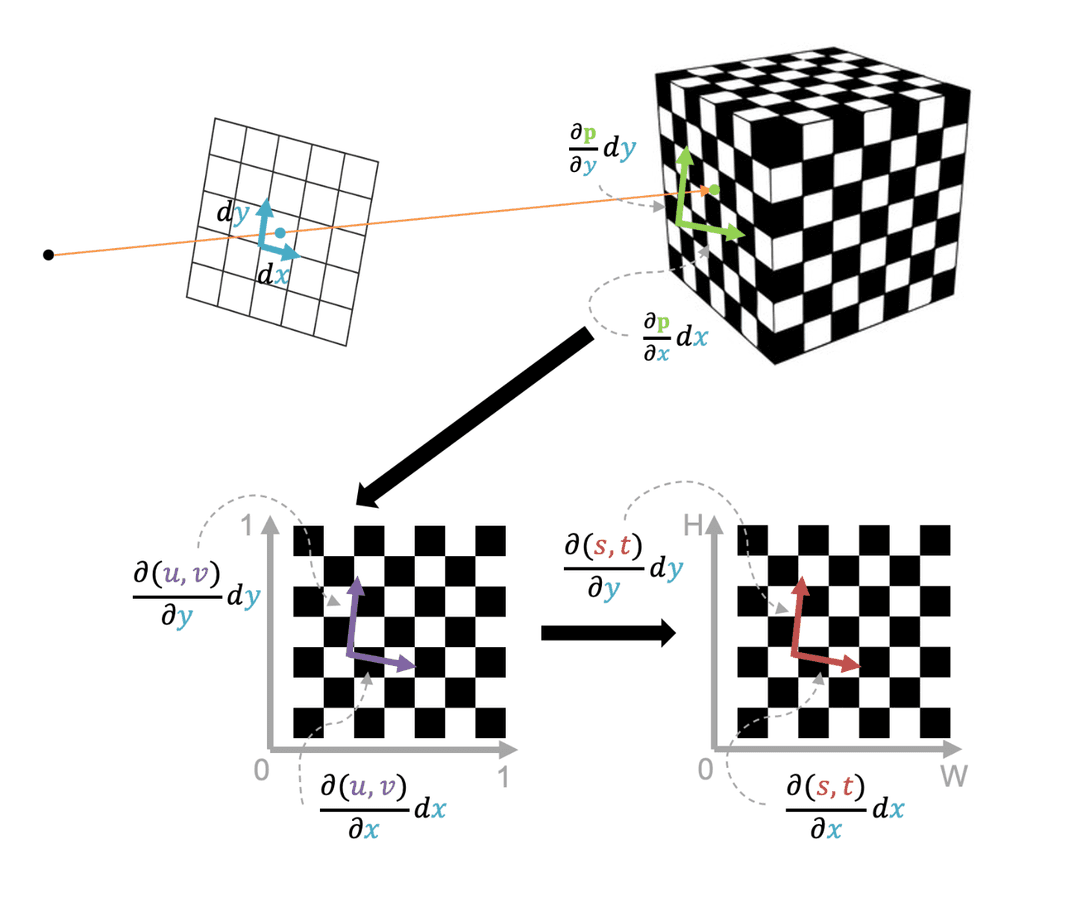
To measure the number of texels the pixel covers, we take a differential approach.
We want to calculate how a small shift in or on the view plane will cause a shift in the intersection point in world space. This is represented as and .
If we choose and to be the length and width of the pixel, then and will give us the sides of the quadrilateral covered by the pixel.
Then we want to calculate how a small shift in a point in world space will cause a shift in and on the UV map of the texture. Finally we want to calculate how a shift in and on the UV map will cause a shift in and on the actual texture map.
By chaining this together, we can calculate how a shift in or causes a change in and , giving us the amount of pixels that a pixel on the view plane covers.
Now, suppose we have mip levels, such that at , the scale factor is . If my desired scale factor is , then the mip level should be .
Note that:
- We have two scale factors and . We can use the max of the two as the actual scale factor.
- and are not necessarily a power of , so we should also linearly interpolate between the nearest two mip levels
Because our texture lookups at each mip level are done via bilinear filtering, and then we combine them with another linear interpolation, the overall method is called trilinear filtering.
Real-Time Graphics
The real-time graphics pipeline is also called the rasterization pipeline or scanline rendering pipeline.
The main difference between raytracing and a real-time graphics pipeline is that we swap the loops.
# raytracing
for each pixel:
    for each primitive:
        trace ray
        intersect object
        compute color

# real-time
for each primitive:
    for each pixel:
        check if primitive covers pixel
        compute color
The real-time pipeline can be parallelized better, since each object can be independently processed and each pixel can be independently shaded. However, we get less photorealistic lighting effects.
Trimeshes
Graphics platforms generally only know how to render triangles. Any shape can be decomposed into triangles; this process is called tessellation, and a shape tessellated into triangles is a trimesh.
The naive representation stores each triangle as three raw vertices, which duplicates shared vertices. The better representation is a list of vertices plus a list of triangles that index into it:
struct Triangle { int v[3]; }

struct TriMesh {
    std::vector<glm::vec3> verts;
    std::vector<Triangle> faces;
}
For each triangle:
- Vertices should be specified in counter-clockwise (CCW) winding order
- CCW order ensures that all triangles in a mesh have consistent normals
- CCW order also enables backface culling, a rendering optimization that skips drawing triangle backs
Each vertex should store interleaved position and normal data. Normals can be:
- Per-face: one normal per triangle, computed via the cross product of two edges,
- Per-vertex: computed by interpolating the normals of the triangles touching that vertex, weighted by triangle area
Meshes are commonly stored on disk in the OBJ format. It lists vertex positions (v), vertex normals (vn), and faces that reference those by index (f 1//1 2//1 3//1).
Meshes can also be generated from:
- Polygon modeling (Maya or Blender)
- Curved surface modeling with splines or Bezier
- Digital sculpting (ZBrush)
- Procedural modeling (L-systems, shape grammars)
- CAD modeling
- Generative models
OpenGL
OpenGL is an industry standard API specification for real-time graphics. An implementation of OpenGL is usually implemented in C, with bindings in other languages.
There are other interfaces for programming the GPU:
- Direct3D is Microsoft's graphics framework and runs only on Windows
- Metal is Apple's graphics framework and optimized specifically for Apple's platforms
- Vulkan is from the same group that maintains OpenGL (Khronos); it is a newer, lower-level API than OpenGL
OpenGL manages all objects and data by their ID. Every function either returns an object ID or takes in an object ID and mutates the object. Some middleware libraries (like three.js) will sit on top of the API and provide OOP support.
Furthermore, OpenGL is a state-based system. The behavior of functions depends on both the input and the state of OpenGL. OpenGL also uses the state to associate objects with one another through a process called binding. For example, to OpenGL to use a shader to render a particular mess, you need to declare the shader as the currently-bound shader to the object.
void initialize() { ... }

// Render the current scene (called every frame)
void draw() { ... }

// Free up any memory
void finalize() { ... }

// Event handlers
void onClick() { ... }

// Register all the above callbacks and start the event loop
void main() { ... }
To tell OpenGL to draw triangles, we send an array with all vertex information in a Vertex Buffer Object (VBO).
We also need to provide a Vertex Array Object (VAO) that describes the scheme of the VBO. For each attribute, the VAO takes in three parameters: size, stride, and pointer. Note that because VBO is a byte array, the parameters need to be multiplied by the size of the attribute.
OpenGL shaders are written in a DSL called GLSL. The shader programs are compiled on the CPU, and the compiled bytecode is sent to the GPU to be executed.
The vertex shader runs in parallel on every vertex contained in whatever VBO is bound when an OpenGL draw command is issued.
- The inputs are the attributes contained in the VBO, as specified by the VAO, as well as the uniform variables declared and bound by the user
- The outputs are the output vertex positions and and any other per-vertex outputs the user wants to compute
The fragment shader runs in parallel on every fragment produced by the rasterization stage
- The inputs are the interpolated outputs from the vertex shader, as well as the uniform variables declared and bound by the user
- The outputs are the depth of the fragment and any color outputs
Appendix
Vectors
A vector transforms a scalar into another scalar. Below, we transform the scalar by shifting it units right and units up.
The dot product is a scalar representation of how similar two vectors are to each other.
Geometric interpretations of the dot product:
- is the squared length of the vector
- when the vectors are perpendicular
- , where is the angle between the arrows
The cross product takes in two vectors and produces a vector that is mutually perpendicular to both vectors. By convention, the direction that points in is determined by the right-hand rule.
Geometric interpretations of the cross-product:
- also gives the area of the parallelogram with and as edges. Half of this area gives us the triangle with and as edges.
Matrices
The identity matrix is a matrix such that for all matrices . The 2x2 identity matrix is:
If we have two matrices and such that , then we say that is the inverse of . Not all matrices have an inverse. For a 2x2 matrix, we have:
Transformations
A transformation is a function that acts on space.
- A linear transformation respects the property
- A matrix transformation is any transformation that can be written in terms of multiplying a matrix and a vector
- Every linear transformation is a matrix transformation
Note that matrix transformations can compose. For example, applying then to vector is equivalent to .
We can build matrix transformations using basis vectors. To find a matrix that sends:
We need to find a matrix that satisfies:
Arithmetically, this matrix is
To reverse the transformation, we can simply calculate the inverse of .
Thus, to send
We can simply calculate the matrix that sends
And the matrix that sends
And then calculate .
Scale, Rotate, and Translate
Both scale and rotate are linear transformations and can be represented by matrix transformations.
-
To scale by in the x-axis and scale by in the y-axis, apply the matrix:
-
To rotate by counterclockwise, apply the matrix:
Translation is not a linear transformation; it is an affine transformation. In order to represent it as a matrix transformation, we add another dimension to it. This is called homogeneous coordinates.
- is if the value is a scalars and if the value is a vector
- does not affect subtraction of two scalars (which produces a vector), addition of a vector and a scalar (which produces a scalar), or dot product (which is mostly between two vectors)
- also does not affect the linearity of scaling and rotation
To translate in the x-axis and in the y-axis, apply the matrix:
Algorithmically, this works to out be:
Note that the order of the transformations matters. The most widely used ordering is TRS, which means to scale, rotate, and then translate.
References:
Non-Axis Aligned 3D Rotation
Scaling and translation in 3D is similar to that in 2D. Rotations are more complicated because we can now rotate around an arbitrary axis. There are several ways to do this: Euler angles, axis-angles, and quaternions.
Euler angles are a composition of rotations around the x, y, and z axes.
The rotation matrices for each axis, by angle , are:
A full Euler angle rotation is the composition , applied right to left.
There are several problems with Euler angles. First, they don't trace the shortest rotational path because they don't follow the geodesic. To fix that, we can linearly interpolate each angle independently with some correction factor. However, this does not produce an even angular velocity. Also, when two rotation axes become parallel, we lose a degree of freedom, leading to odd behavior at the point.
Axis-angle rotations involve decomposing a point into two parts relative to the axis :
- is the part parallel to ; rotation does not change it
- is the part perpendicular to ; it rotates like a 2D point in a plain perpendicular to
To calculate it, we need:
Which can be expanded to:
The formula for the cross product can be represented as a matrix, so this entire equation can be rewritten in matrix form. Unfortunately, axis-angle rotations also do not sweep the shortest path between two points.
Quaternions are the only rotation method that can correctly do linear interpolation. A quaternion represents a rotation as a point on the surface of a 4D hypersphere. Because we are moving along the sphere, we get shortest path and constant angular velocity.
References: Visualizing quaternions
Convolution
Discrete 2D convolution takes in an image and kernel32, and produces an image.
To do convolution:
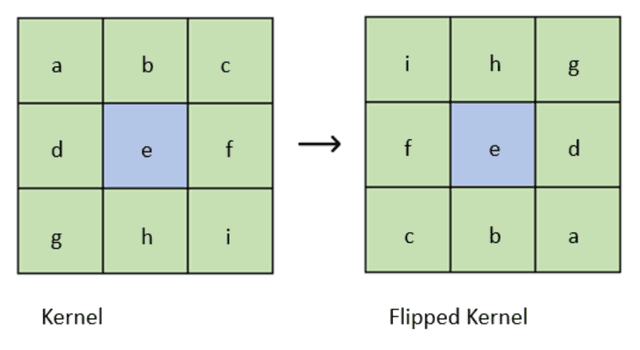
- Flip the kernel3334
- Allocate space for an output image
- For each on the output image: a. Do element-wise multiplication between the rotated kernel and the region of the image centered on b. Then compute the sum of the elements of the resulting matrix c. Finally, set the value of the output image at
For some intuition, consider what a few simple kernels do:
- The identity kernel has a single
1at the center and0s elsewhere. - The right shift kernel has a
1one position to the right of center. - The left shift kernel has a
1one position to the left of center.
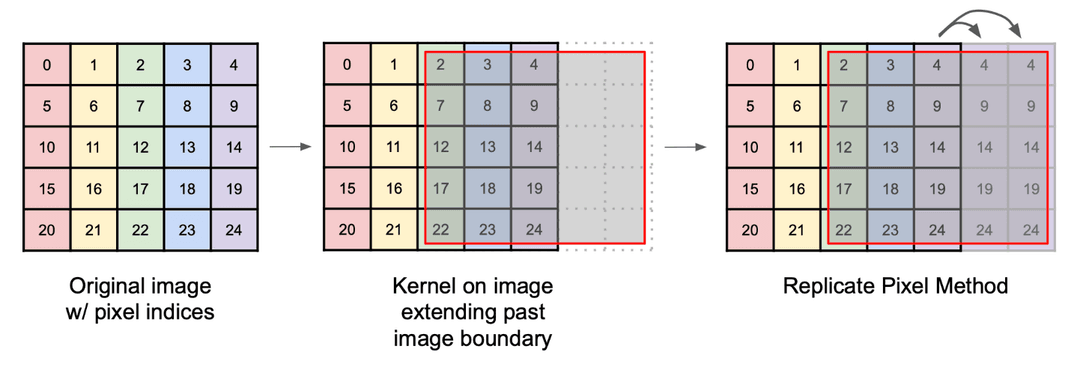
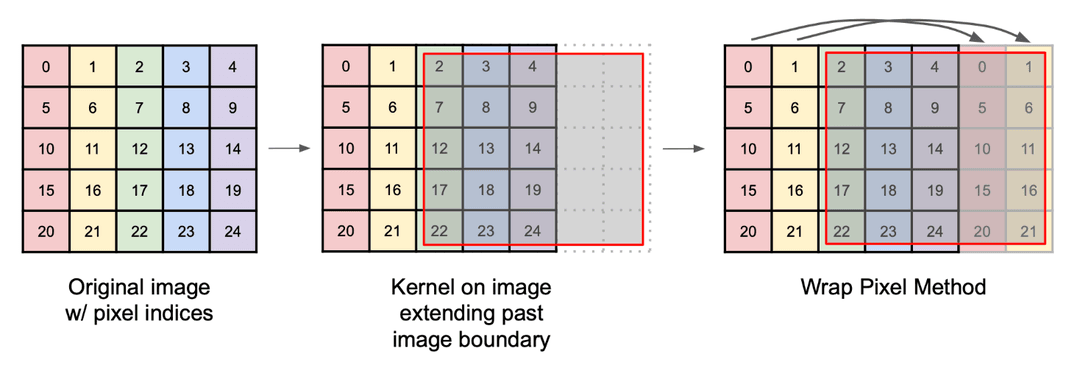
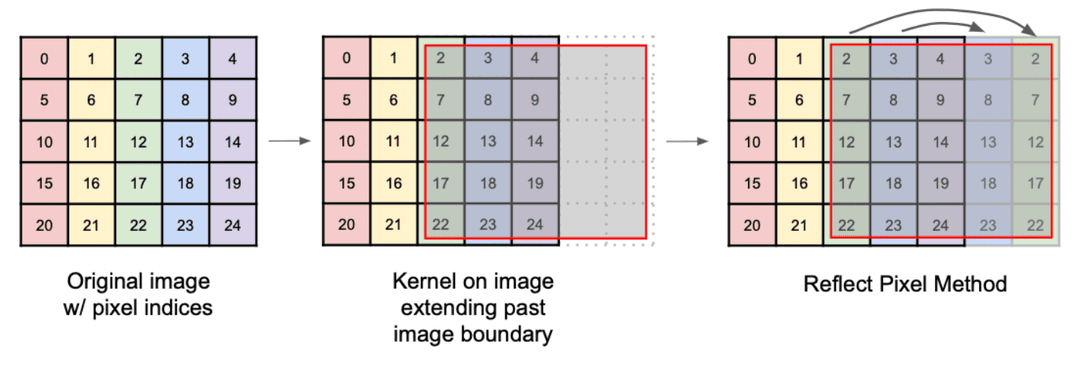
Near the border of the image the kernel hangs off the edge, so we have to decide what it reads there. The usual choices are to clamp to the nearest edge pixel, wrap around to the opposite side, or reflect across the edge.
Separable Kernels
Some 2D convolutions can be expressed as the outer product of two 1D kernels. A 2D convolution of an image with a separable kernel is equivalent to:
- A 1D convolution of the columns of the image by the vertical 1D kernel
- A 1D convolution of the rows of the image by the horizontal 1D kernel
A separable kernel can be faster than a non-separable kernel. With the 2D filter, we need to do roughly calculations. With the two 1D filters, we only need to do around calculations.
Lambertian BRDF measures the cosine similarity between the surface normal and the direction to the light. See BRDFs.
Phong BRDF meaures how closely the reflected ray aligns with the unit direction to the viewer. See BRDFs.
"Distributed ray tracing" by Cook, Porter, and Carpenter