Booting
Stages of Booting
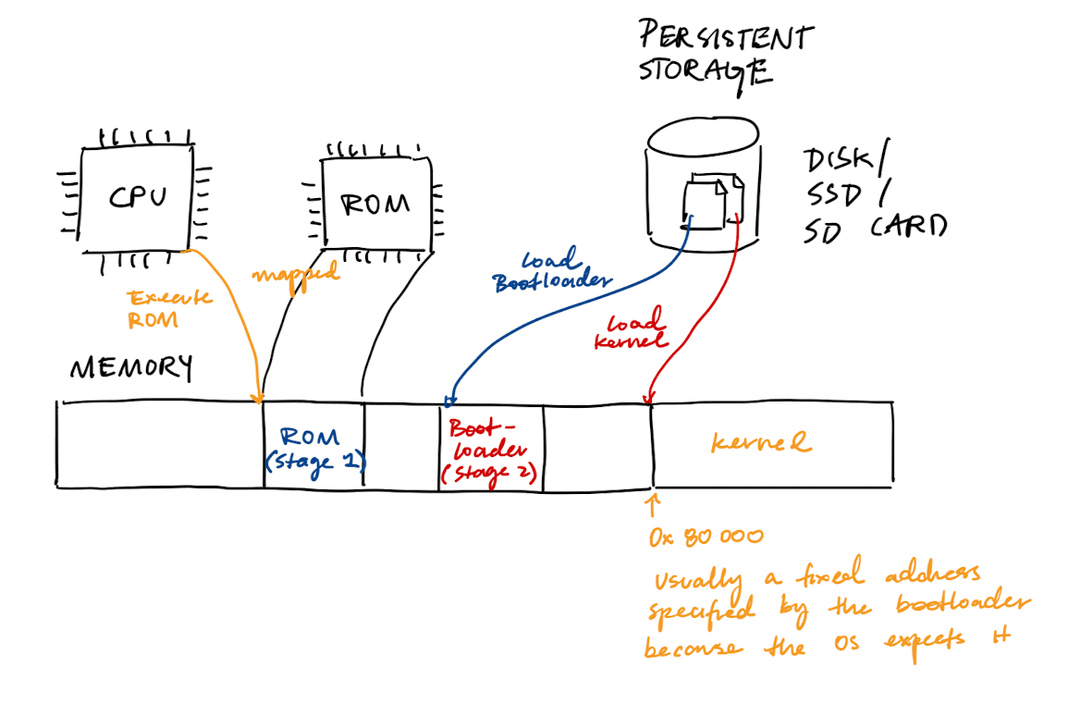
Booting proceeds in stages:
- Stage 0: CPU starts executing the ROM
- Stage 1: ROM loads the bootloader from persistent storage
- Stage 2: Bootloader loads the kernel ("image") into a fixed physical address
In stage 0, there is a fixed circuit that tells the CPU to jump to the first instruction of read-only memory (ROM). ROM can be both directly executed and mapped into RAM.
The stage 1 bootloader in ROM enables necessary devices (harddisk, SSD, RAM) and loads the stage 2 bootloader from persistent storage into RAM. This bootloader is generally fixed-size and OS-independent.
The stage 2 bootloader is usually a program that is stored in a fixed location on the storage device. (This helps the stage 1 bootloader find it.) The stage 2 bootloader is usually configurable by the programmer. It is generally written in assembly because C assumes that there is a stack, which does not exist yet.
The stage 2 bootloader is responsible for loading the kernel into a fixed address in RAM. It then jumps to the first instruction of the kernel code. The OS kernel sets up its own stack and memory segments.
Booting Example: x86-64, Apple Silicon, and Raspberry Pi
| Stage 0 | Stage 1 | Stage 2 | Stage 3 | |
|---|---|---|---|---|
| x86-64 | BIOS (ROM on flash) | Bootloader (MBR on disk) | Bootloader (disk) | OS (disk) |
| Apple Silicon | SecureROM (ROM on SoC) | iBoot1 (NOR flash) | iBoot2 (SSD) | MacOS (disk) |
| Raspberry Pi | Bootloader (ROM) | bootcode.bin (SD card) | start.elf, armstub.bin (SD card) | kernel8.img (SD card) |
x86-64
- BIOS stands for the Basic I/O System. It intializes hardware (RAM, hard disks, SSD, I/O devices). BIOS is configurable despite living on ROM because it is connected to a CMOS unit (flash) that has a small battery keeping it awake. Note that BIOS is a legacy boot method, and there is a new UEFI method.
- MBR stands for Master Boot Record, and it lives on the very first sector of the hard disk (block 0). When BIOS boots a hard disk, there is a bootloader on the MBR which just finds the next bootloader.
- Examples of "stage 2" bootloaders include GRUB (Linux), Windows Boot Manager, and U-Boot.
Apple Silicon
- For Apple, security is extremely important. Each stage of this boot process is cryptographically verified.
- NOR flash is a type of memory that allows a processor to read and execute code directly from the chip.
- iBoot1 initializes basic hardware.
- iBoot2 builds the Apple Device Tree (ADT) and passes it off to the kernel.
- To run Linux on Apple Silicon (Asahi Linux), it is possible to put m1n1 in Stage 3, which can then run U-Boot, GRUB, and then the Linux kernel.
Raspberry Pi
- Despite the fact that the bootup code lives in the SD card, a big chunk of it is run on the videocore GPU
- Many computers rely on binary blobs of firmware because a lot of device manufacturers do not want to share proprietary pieces of information
References:
Secure Boot
In some booting processes, each component is cryptographically verified through a chain of trust. The chain of trust begins at the hardware level, laid down during chip fabrication. Each step checks that the next step is cryptographically verified.
For example, Tesla depends on secure boot to lock down software components of the car. If we can change the booting process, then we can modify the software to do what we want—like unlocking the backseat heater.
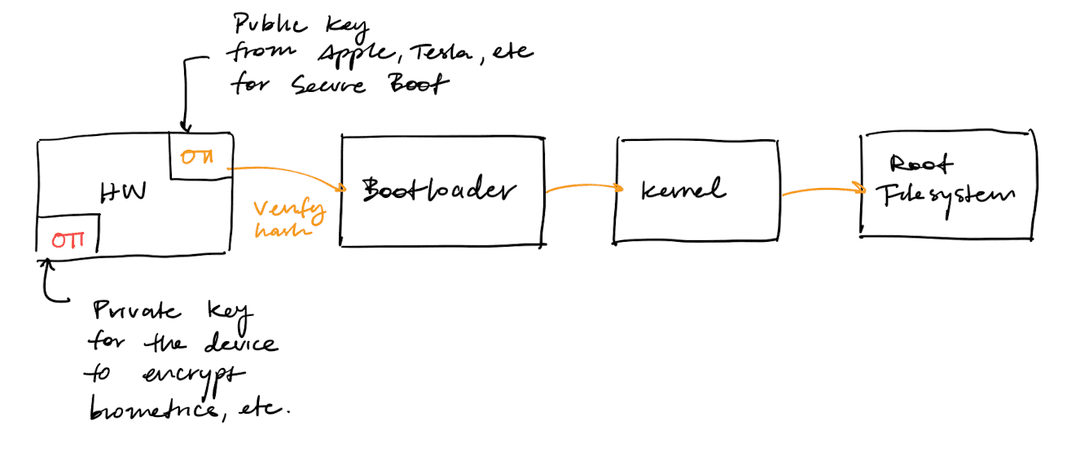
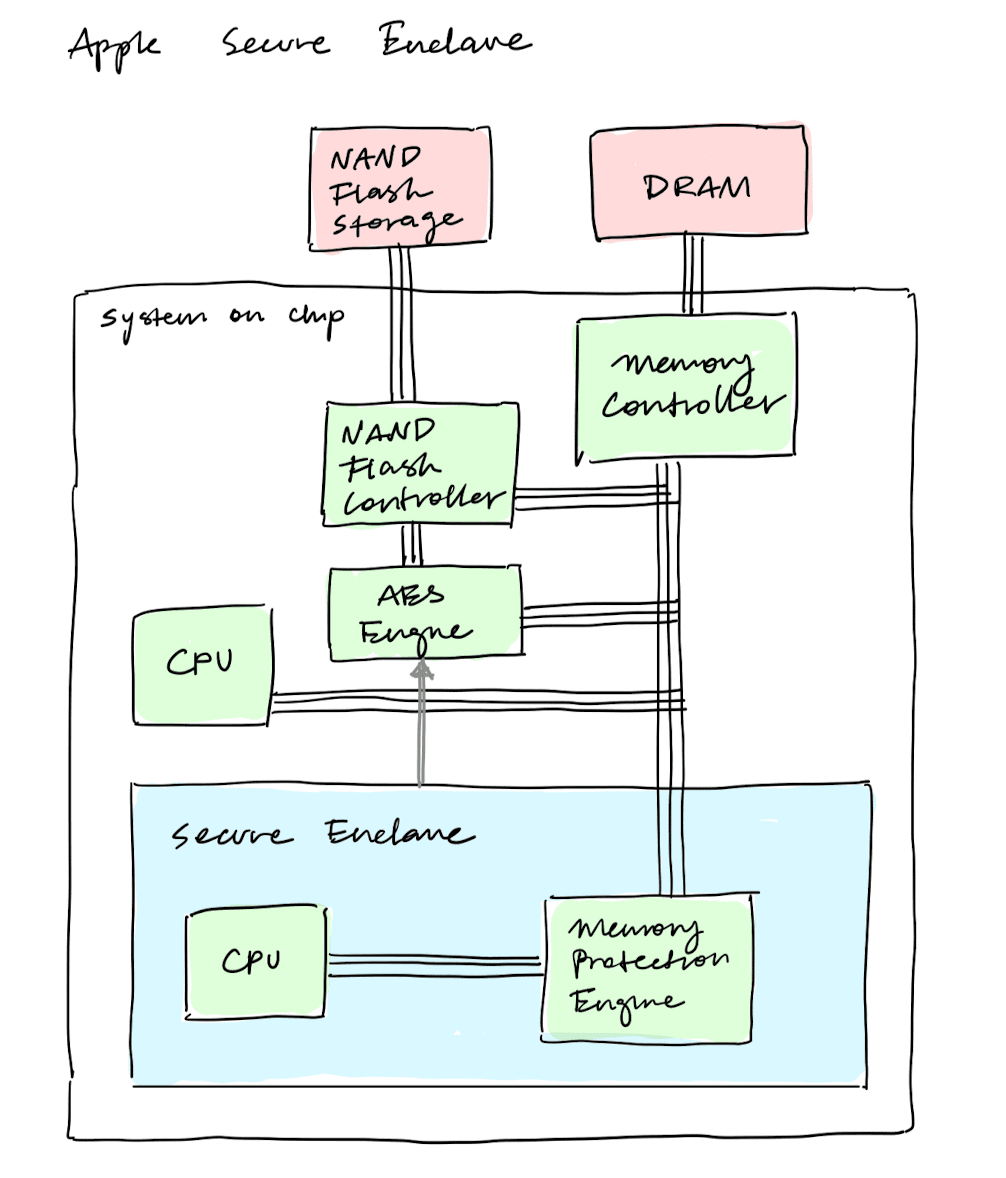
Apple also increases its security by having a separate secure enclave within its system on chip. Only the secure enclave has access to private information, like biometrics and encryption keys. Having a separate secure enclave helps defend against side-channel attacks.
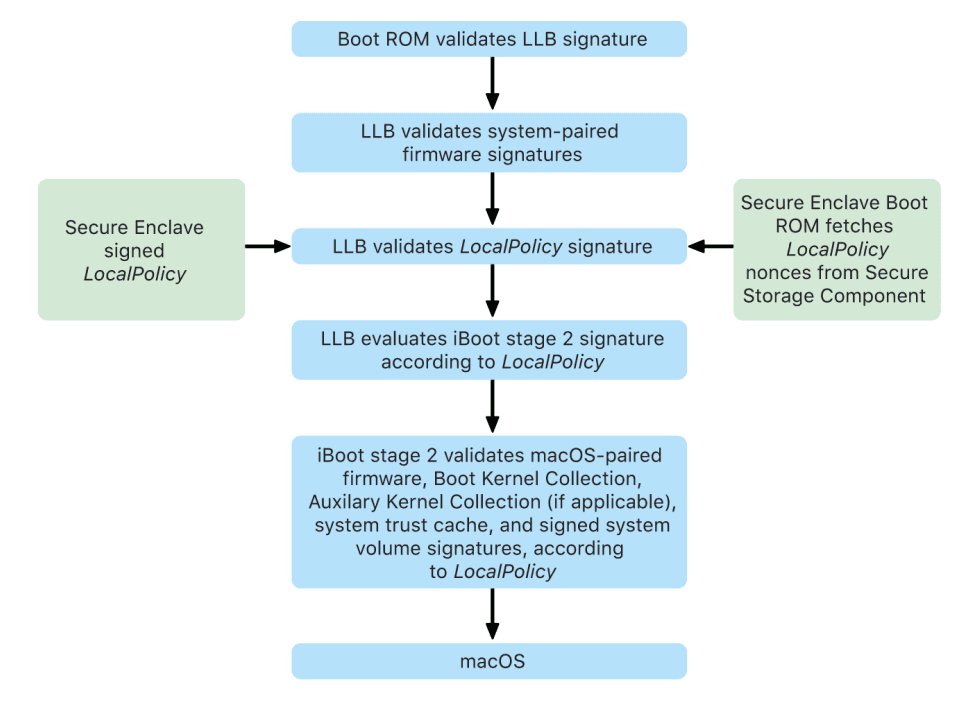
For Macs with Apple silicon, each step checks that the component is signed by Apple. The boot process looks like this:
References:
- Jailbreaking an Electric Vehicle in 2023 or What It Means to Hotwire Tesla's x86-Based Seat Heater
- Apple Platform Security document, specifically the sections "The Secure Enclave" and "Secure Boot"
I/O Devices
Device Drivers
An I/O device will expose some kind of interface that allows us to control the device. These interfaces are commonly called device registers. If we change the bits in a device register, this will physically pull the pin HIGH or LOW and change the state of the device. For example, if you want to send a character to the console, you can write the character to the device's data register.
Device drivers are pieces of software that understands how to interact with the device and its device registers. Device drivers typically run inside of the kernel because interacting with devices is a privileged operation.
Device Example: UART
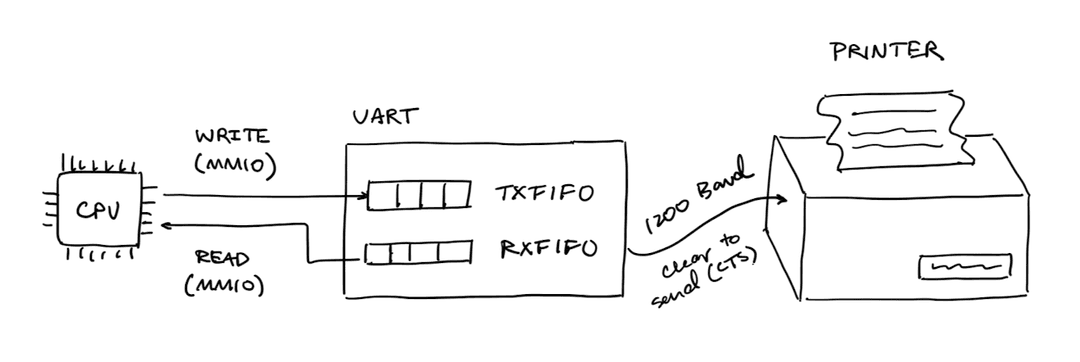
UART stands for Universal Asynchronous Receiver-Transmitter. It is a hardware device that can communicate with other devices via a receiver and transmitter.
Note that UART needs to be modified so that it works with the attached device. It can be customized in terms of:
- Baud rate (bits/second)
- Number of bits per character (7 or 8)
- Parity
The UART exposes the following device registers:
- Control Register (CR): turns device and transmission on and off
- Line Control Register (LCRH): configures transmission parameters lke bits per character and parity
- Baud Rate Registers (IBRD, FBRD): set baud rate
- Flag Register (FR): can be read to understand state of hardware (e.g. whether FIFOs are full)
- Data Register (DR): used to actually send and receive data
Device Example: USB
Similar to UART, USB (Universal Serial Bus) is another protocol that supports peripheral devices. This is possibly what your keyboard or mouse is using when it is plugged into your computer.
Compared to UART, USB is much more complex, and the USB host controller driver is an enormous amount of code.
PMIO and MMIO
Question: Now that the devices expose device drivers, how can the CPU actually modify these device drivers?
There are two primary means of communication:
- In port-mapped I/O (PMIO), there are explicit I/O instructions, such as
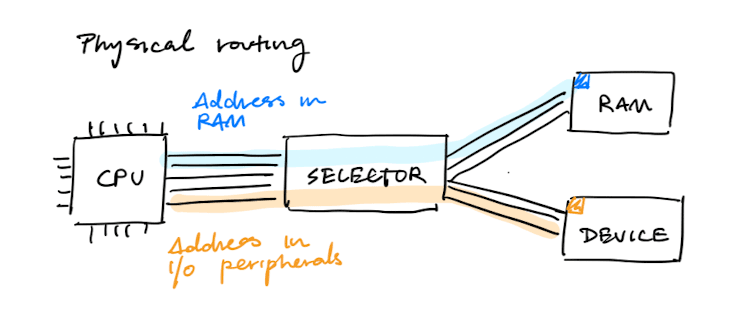
in <register>, <port>andout <register>, <port> - In memory-mapped I/O (MMIO), the hardware makes device registers available as if they were memory locations. When the OS issues a read or write to the address, the hardware routes it to the device.
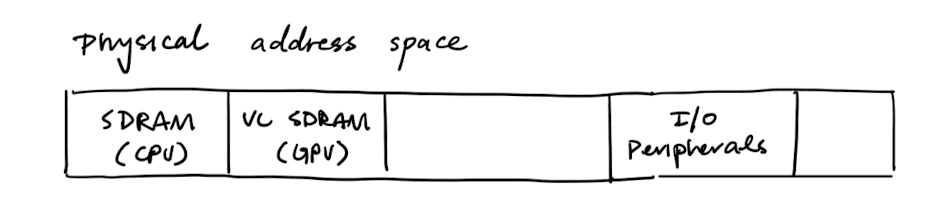
With memory-mapped I/O, the physical address space now contains more than just RAM. On bare metal, the physical address space comprises of:
- RAM regions used by running programs
- Reserved regions wired directly to hardware devices (like console)1
When the CPU attempts to access a memory address, there is a selector that either routes it to the connected device or to RAM.
Program Loaders
Programs are stored in an executable format on persistent storage. This executable format may contain:
- Machine code
- Global variables
- Entry point
- Relocation information
Different operating systems have different executable formats:
- Unix/Linux: ELF
- MacOS: Mach-O
- Windows: PE (Portable Executable)
To run a process, the OS needs to read the execuable from disk and run the program loader. The program loader's job is to parse the executable format and load the relevant segments into the memory region chosen for the sepcific process.
The loader must also ensure that all pointers contained in the executable point to the right places in memory. This may involve relocating sybols (functions and variables) whose memory addresses aren't known at compile time, but only at load time.
In early operating systems, this loading process was done eagerly, all at once before running the program. Modern operating systems perform this process lazily, loading pieces of code or data only as they are needed during program execution.
For more information about the ELF format, see CSCI 1655 notes.
Processes
Multiprogramming
Instead of running each process one by one (batch programming), we may want to run more than 1 program on the computer concurrently (multiprogramming).
Question: Why do we want multiprogramming?
Compared to the CPU, hardware devices are very slow. If we didn't have concurrency, the CPU might be idle for long periods of time while the program is waiting for I/O. Running several processes concurrently lets the OS multiplex a fast CPU across slow devices.
Question: What do we need for multiprogramming?
First, we need to be able to load multiple processes into memory. We also need a way to keep track of each of these processes through some kind of data structures. Finally, we also need a way to switch the CPU between different processes.
The Process Table
A process descriptor, also known as a process control block (PCB), is a data structure that stores information about a single process. It contains:
- The state of the process (
UNUSED,USED,RUNNABLE,RUNNING) - The process ID (PID), so that programs can refer to a process without having a pointer into kernel memory
- A pointer to the stack2
- A pointer to the context3
A process table is just an array of process descriptors. The kernel maintains a pointer to the descriptor of the current process running on the CPU.
The idle process is always runnable and yields immediately. It is necessary to run the idle process when there is nothing else to schedule.
Context-Switching
From the CPU's point of view, a running process is just defined by:
- The general-purpose registers (
x0-x30) which hold the program's live values, base pointer (inx29), and return address (inx30) - The stack pointer (
sp) which points to the top of the stack - The program counter (
pc) which contains the address of the next instruction to run - The processor state, which includes condition flags (N/Z/C/V) that a following conditional branch depends on, the current exception level, which stack pointer is in use, and which interrupts are masked
To change the process that the CPU is working on, we must save the running process's context and load another process's context. This is called a context switch.
The mechanism for a context switch usually involves a function to save_context and restore_context.
save_contextstores the context of the process on the process's stack, allowing the kernel to switch to a different process4restore_contextfinds the saved context on the process's stack (using the metadata in the process descriptor) and restores the registers
Why do we store the context on the process's stack?
There are two obvious places where we can store the context:
- Inside the process descriptor
- On the process's own stack
Design (1) does not generalize well to nested interrupts. Suppose that an interrupt occurs when we are partway through handling another interrupt or syscall. Each nested interrupt should have its own slot for saved registers. If we merely store a context struct inside of the process descriptor, we cannot represent this linear structure.
Concurrency
In order to do a context switch, the OS needs the ability to stop the CPU from running some process. However, the OS is itself a process that needs to run on the CPU.
There are two ways the OS can get the CPU back from a running process: (1) cooperative concurrency and (2) preemptive concurrency.
In cooperative concurrency5, the process gives it up voluntarily by calling into the kernel directly via yield(). yield should:
- Save the process's context
- Record where the context is in the process descriptor
- Change the process's state
- Decide which process to run next
- Resume that process by restoring its context
The problem with cooperative concurrency is that it depends on the process being polite. To allow the kernel to forcibly take back the CPU, we need preemptive concurrency. The kernel takes the CPU back by arranging a hardware timer to interrupt the CPU periodically. When the timer fires, the CPU stops executing and jumps into the kernel, where it can schedule another process.
There are several components that are necessary for preemptive concurrency:
- A timer device needs to periodically create interrupts
- An interrupt controller needs to deliver the interrupt to the CPU
- Once the CPU is interrupted, it should be configured by the hardware manufacturer to jump straight to the trap table
- The trap table needs to be configured to jump to the asynchronous interrupt handler
- The asynchronous interrupt handler needs to detect which interrupt occurred and call the appropriate handler (in this case, the timer interrupt handler)
Scheduling
The kernel needs to figure out which task to run next. The scheduler should be:
- Fair - no task should starve
- Fast - picking a task should be cheap
- Responsive - interactive tasks need low latency
- Scalable - work on hundreds of CPUs
History of Linux Scheduler
The original scheduler (1991-2001)
The original scheduler was O(n). To pick the next task, it scanned every runnable task and picked the one with the highest "goodness" score. This made it slow.
The O(1) scheduler (2003)
The O(1) scheduler kept two arrays for each CPU (active and expired). Each array element was a double-linked list of all runnable tasks at that priority. There was also a bitmap recording which buckets were non-empty. To pick the next task, the scheduler finds the highest priority non-empty list and takes the first element from that list. When a task finished its timeslice, it moved from active to expired. When active emptied, swap the pointers.
The Completely Fair Scheduler (2007)
CFS added the idea of virtual runtimes. Each task has a vruntime, which is the amount of CPU time it has consumed, weighted by its priority. The scheduler always runs the task with the smallest vruntime. This is provably fair because over time, all tasks at the same priority converge on equal CPU share.
While CFS is fair, predictable, and good for most workloads, it was not great for real-time and latency-sensitive workloads (network I/O, audio,and gaming). A task that wakes up and needs to run quickly might have to wait behind tasks that technically have smaller vruntimes, even if those tasks have been running for a while.
Earliest Eligible Virtual Deadline First (2023)
EEVDF added the idea of virtual deadlines. It schedules the task with the most urgent deadline, among those who are eligible to run. A task is eligible if its vruntime is at or behind the current virtual time of the queue.
Each task has:
vruntime- virtual time consumeddeadline- virtual time by which it must runslice- requested time slicevlaghow far behind or ahead the task is relative to ideal fair share
In most cases, the deadline is computed from the priority, but an application can also explicitly set it.
References: Linux Scheduler Evolution
Display
Preemption also allows the OS to respond to devices quickly. When a network packet arrives or when there is a disk read, the data is stored in a limited memory region.The OS needs to respond before that memory region is overwritten by other data.
To achieve this, peripheral devices make an interrupt request. This triggers the interrupt handler, which quickly takes the bytes out of the hardware FIO and puts them into a buffer in memory. Then it terminates and gives control back to the running process. Later, a process consumes the bytes in the buffer.
While processes are waiting for a device, they are in a BLOCKED state. Usually, there is a wait channel that allows the blocked process to be associated with some event, such as the address to some kernel data structure. The interrupt handler will wake up every process blocked on the same address by marking them as RUNNABLE for the scheduler.
Screen and Framebuffer
A screen is composed of pixels. Each pixel is composed of multiple bits which describe the alpha, red, green, and blue channels.
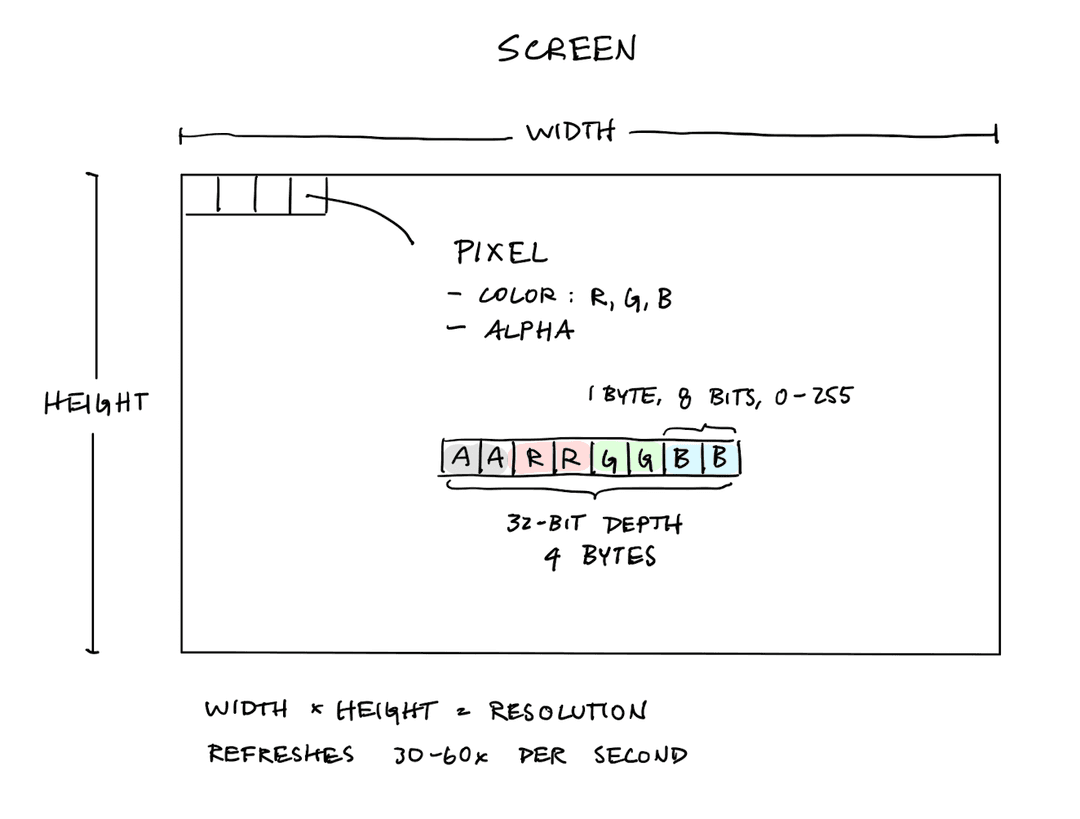
A framebuffer is a region of memory6 that the hardware continuously reads and then renders on the display.
User programs can read the FB_INFO_BASE to find the address of the framebuffer, and then they can write directly into this framebuffer to render things on the screen.
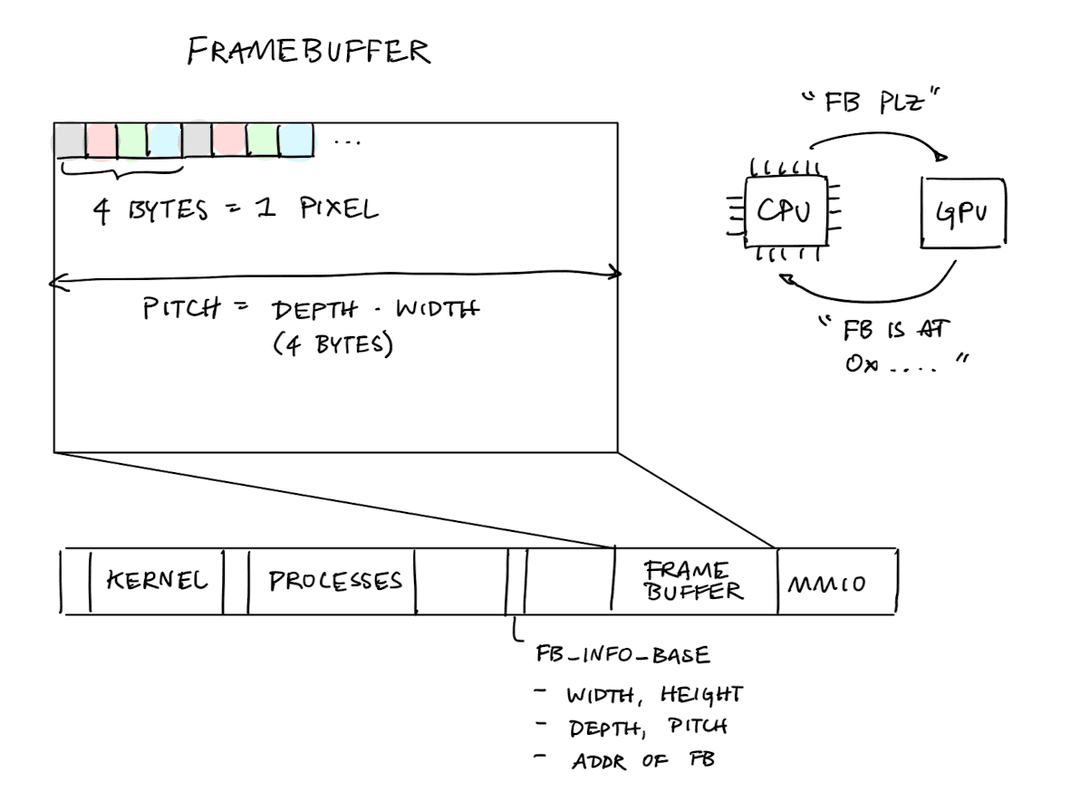
While the screen can be shared across multiple processes, the input keyboard has to go to some process. Most windowing systems handle this by setting a foreground process or window.
How are fonts rendered on screen?
Fonts also need to be encoded in terms of bits. The most basic font encoding is a bitmap, which encodes the appearance of each letter instead of 8x8 pixels.
Modern font encodings usually use vector encodings because they scale better.
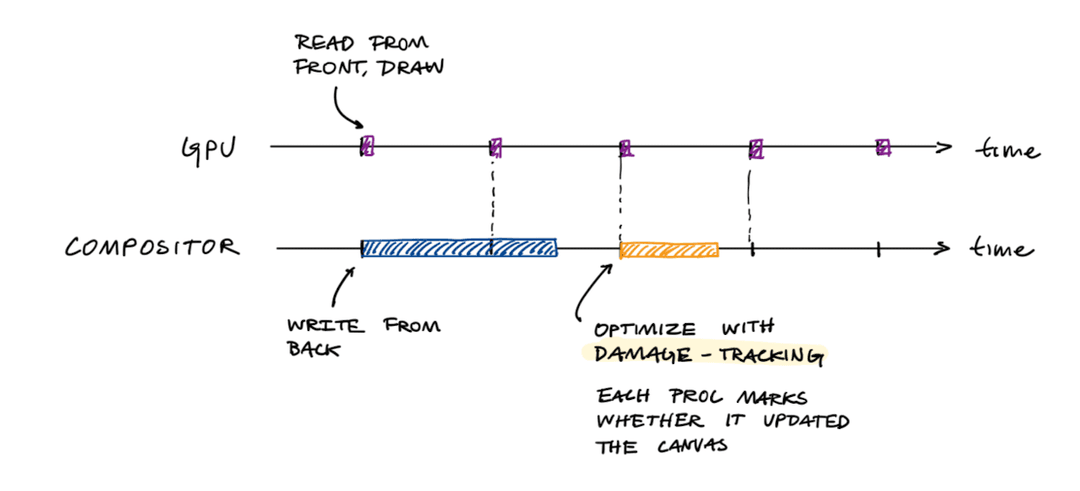
The compositor7 is responsible for copying the contents of the process' canvases into the framebuffer. This allows us to implement a tiling window manager and a floating tiling manager.
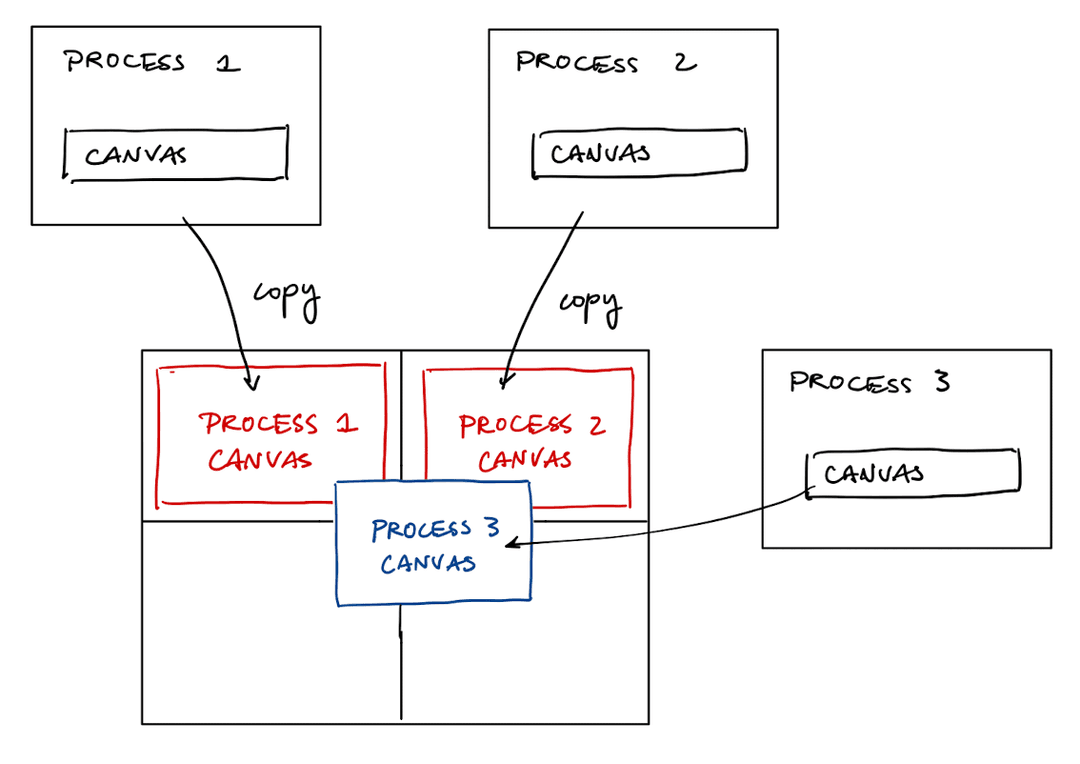
Tearing
If the compositor (CPU)8 and the GPU both access the framebuffer at the same time, we can get a race condition. This can result in screen glitches called tearing.
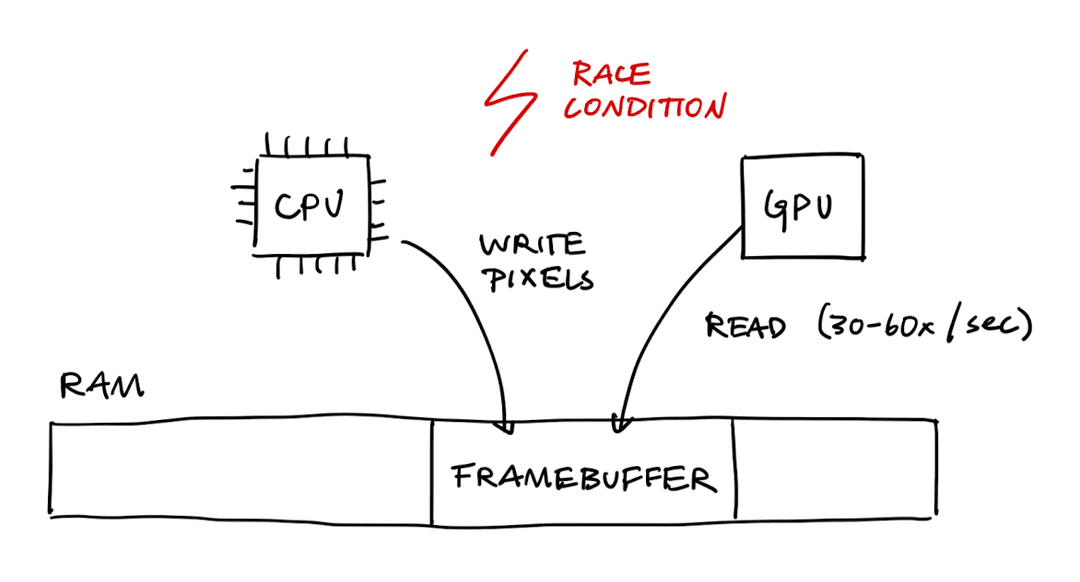
Double-Buffering
A race condition is defined as when two entities access the same memory location at the same time, and at least one operation is a write. To avoid a race condition, we can instead read and write from different framebuffers using a technique called double buffering.9
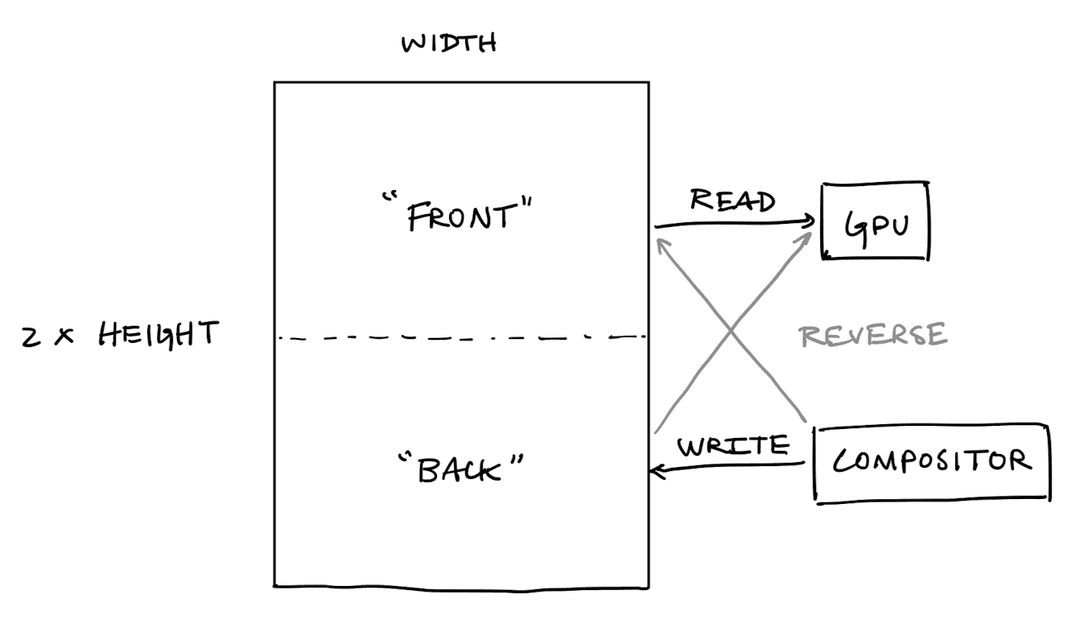
Damage-Tracking
Furthermore, we need to make sure that the compositor runs fast enough to update its framebuffer 30-60x a second. For example, we may want to do damage-tracking to check which process' canvases actually changed since our last read.10
Wait for Vsync
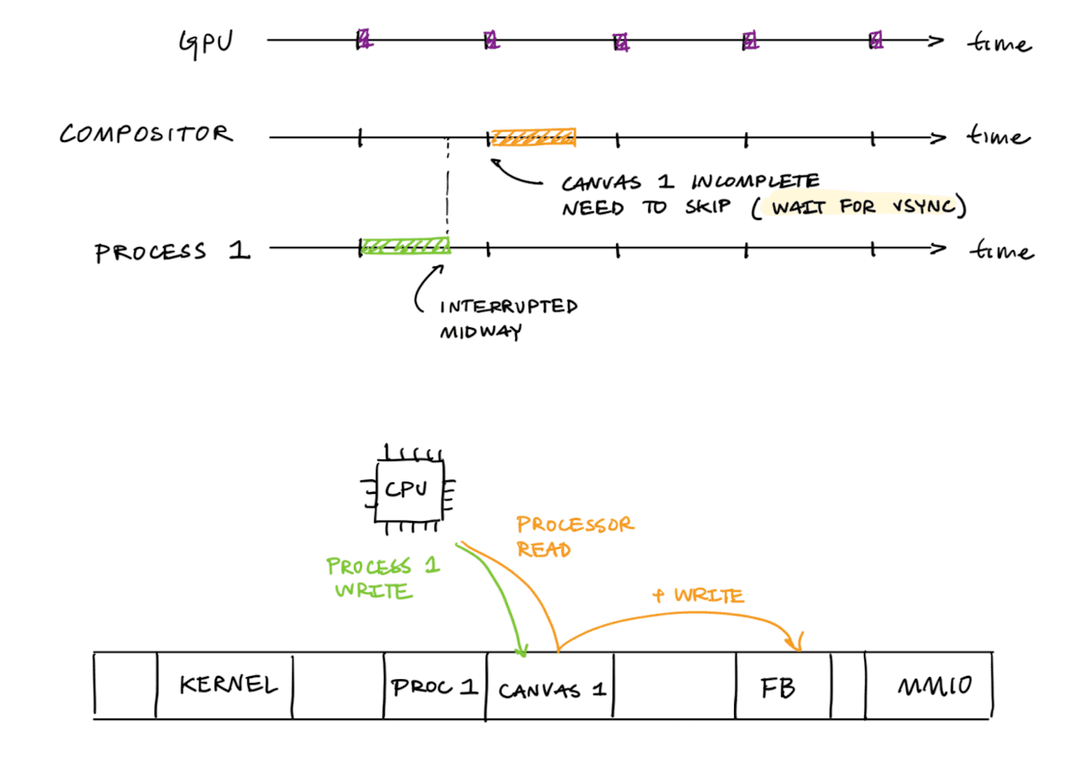
Recall that the process is writing to its canvas and the compositor is copying those contents to the framebuffer. It is possible for the process to be interrupted before it is finished writing to its canvas.
We thus need to make sure that the process itself and the compositor are synchronized. One solution to this is "wait for vertical sync," which tells the compositor to wait for the process to finish writing.11
System Calls
Calling Convention
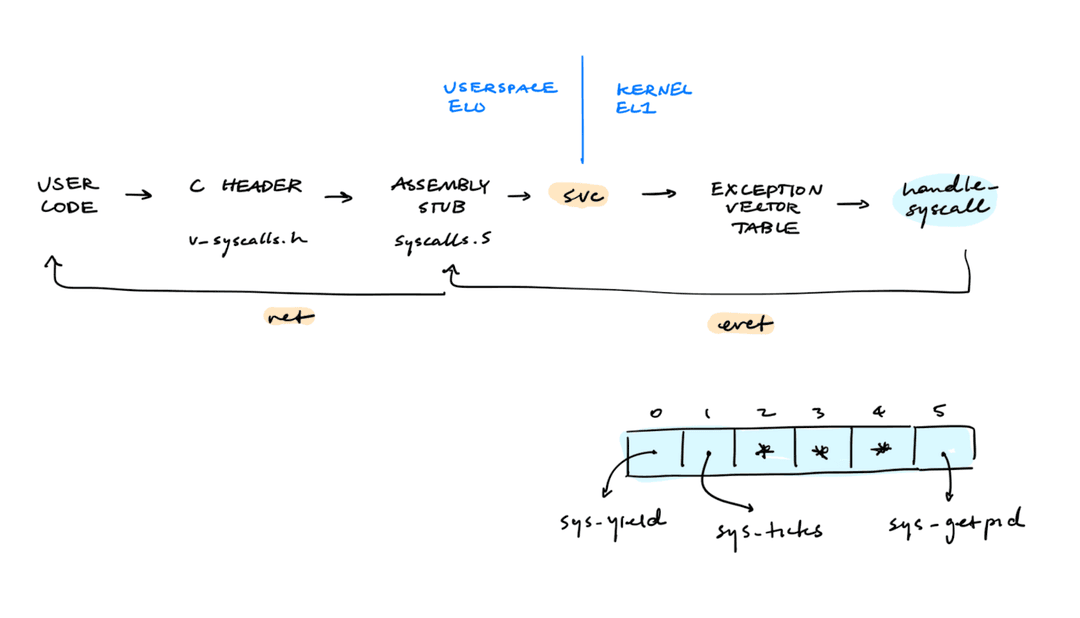
The Application Binary Interface (ABI) specifies the system calls exposed by the kernel for the userspace program.
Userspace programs can make a system call by invoking svc with the right system call number. Arguments should be passed in registers x0-x5 in order. A syscall can have at most six arguments. The return value will be returned in register x0.
On a system call, the hardware will:
- Save the current
pcandPSTATE - Set
pcto a fixed location in the exception vector table - Switch to the kernel stack
- Mask interrupts
Process Descriptors
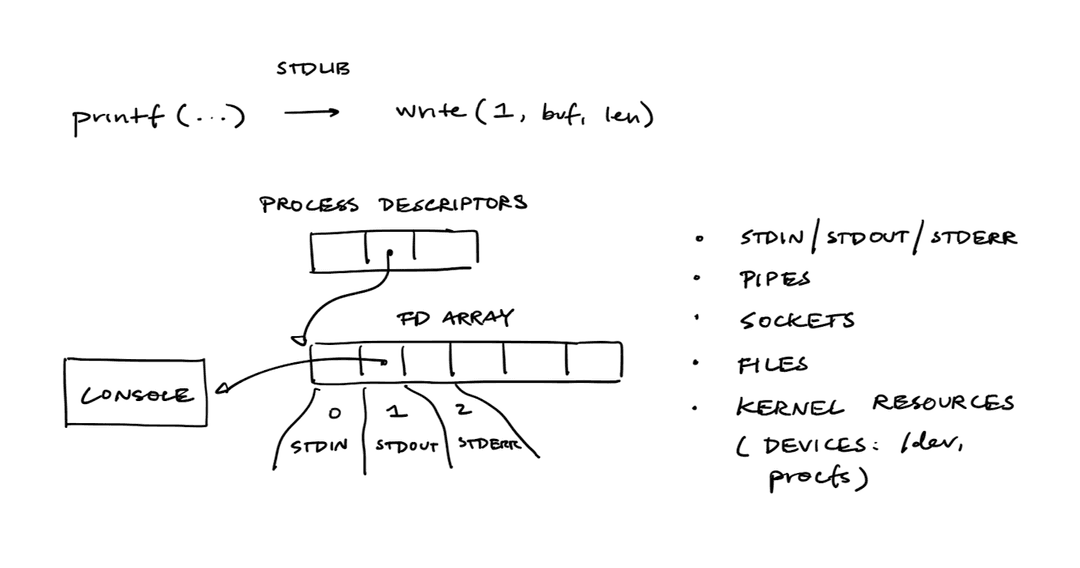
In Unix, everything acts like a file with a file descriptor. To implement syscalls like read, write, fork and exec, it is necessary to also implement file descriptors.
Shell
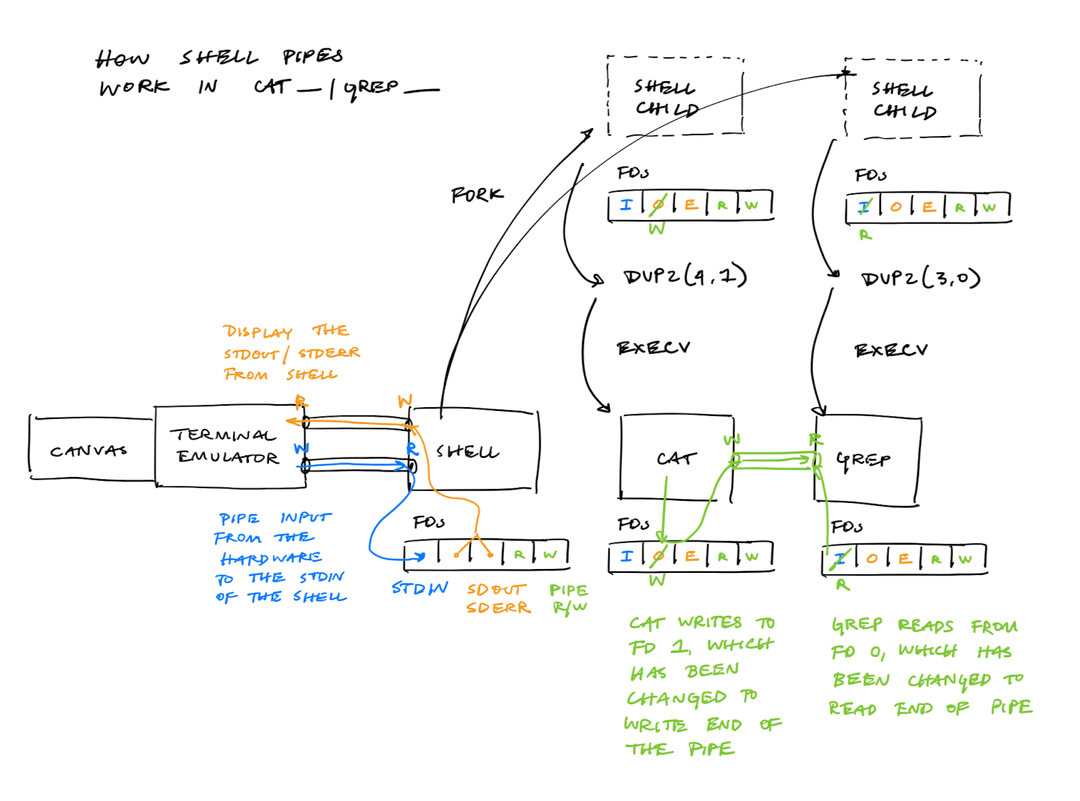
The shell uses fork and execv to run multiple programs (and pipe them). The main idea is to fork the shell program, modify FD 0 and 1 so that the new program reads and writes to the right FDs, and then execv the program.
Virtual Memory
We want to prevent one process from reading or writing into the memory of another process.
Base and Bounds
One early memory protection mechanism was called base and bounds. In base and bounds, there is a BASE and BOUNDS register which holds the range of memory that the process can access. On each memory access, the CPU checks whether the memory falls within [BASE, BASE + BOUNDS].
One issue with this scheme is that it requires that the process is contiguous in memory. To grow a process, we may need to copy the entire process space to a new place in memory.
Segmentation
As we have more processes, the physical memory may quickly grow small holes of free space, leading to external fragmentation. One solution to this problem is to give each memory segment in a process (stack, heap, code and data) a separate BASE and BOUNDS register. This idea is called segmentation.12
Appendix
The appendix contains specific details about Raspberry Pi architecture, ARM64 architecture, and CSCI 1670 projects.
Raspberry Pi Architecture
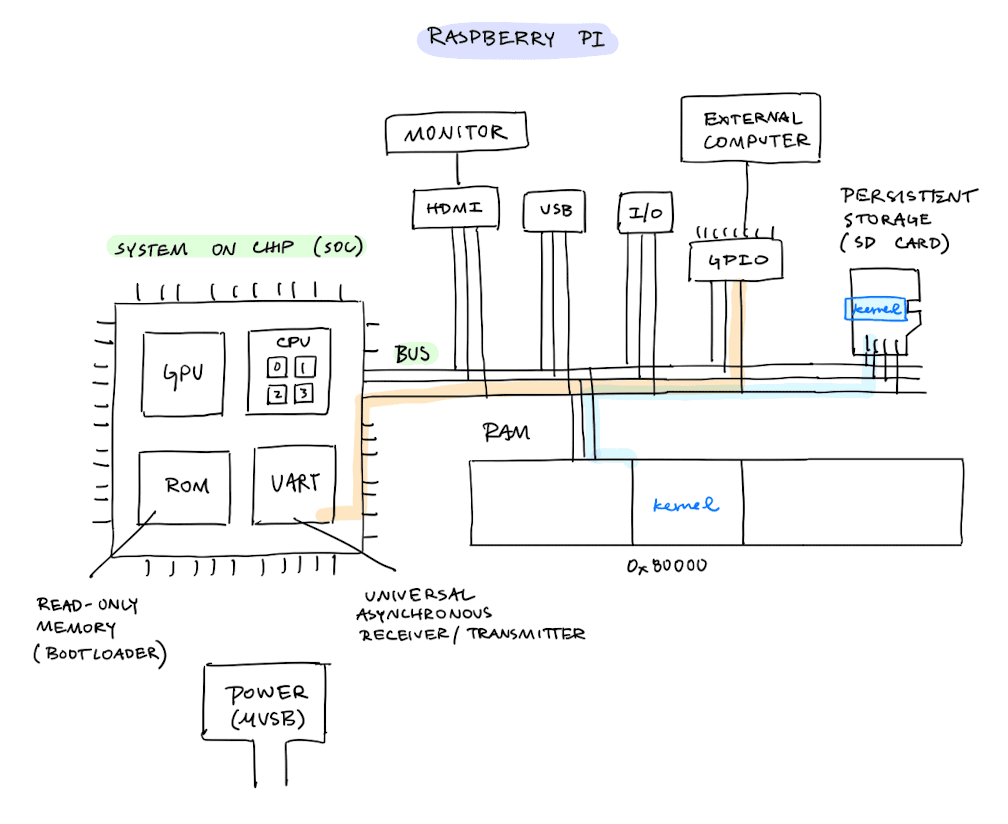
The diagram below shows a simplified view of the Raspberry Pi architecture. Notice that ROM and UART are both on the system on chip (SoC).
Raspberry Pi Memory Layout
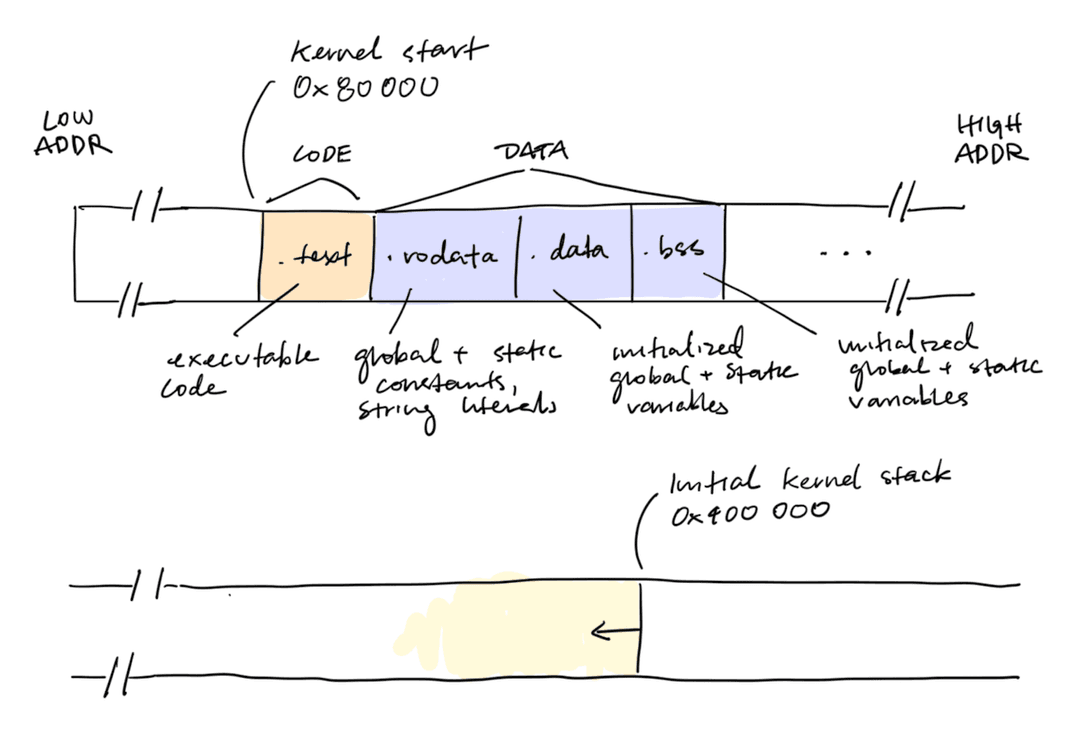
On the Raspberry Pi, the kernel must be at the fixed address 0x80000. The kernel stack can be placed at an address of your choosing.
ARM64 Architecture
ARM64 (also sometimes called "AArch64") is a computer architecture. Practically all mobile device and some laptops (such as Apple Silicon Macbooks) use ARM64 over x86-64 because its processors have significantly lower power consumption.
Compared to x86, ARM64 has many more registers used for specific tasks.
| Feature | x86-64 | ARM64 |
|---|---|---|
| General-purpose registers | %rax, %rbx, %rcx, %rdx, %rsi, %rdi, %rbp, %rsp, %r8 to %r15 (16 total) | x0 to x30. w0 to w30 are their lower 32-bit halves (writing a w register zeroes the upper 32 bits) |
| Stack register | %rsp is one of the 16 general-purpose registers | sp is a dedicated system register |
| Return address | The call instruction pushes the return address onto the stack. | The bl ("branch with link") instruction puts the return address into lr, and ret jumps to whatever is in lr. |
| Arguments and return values | Arguments are stored on the stack and return values are stored in %rax. | The first eight arguments go into x0 to x7. The return value comes back in x0 |
Additionally, ARM64 instructions are more specific than those in x86-65:
- ARM64 has special system registers which control the CPU. Only special
mrs(read) andmsr(write) instructions can read and write to system registers. - x86-64 uses
movinstructions to move data to and from registers. ARM64 requires you to use explicitlrd(load) andstr(store) instructions to load and store from memory. - x86-64 instructions can vary in length, while each ARM64 instruction is exactly 4 bytes.
ARM64 Exception Levels
ARM64 has several exception levels which control hardware access permissions.
- EL3 ("secure monitor")
- EL2 ("hypervisor")
- EL1 ("kernel")
- EL0 ("userspace")
The ARM architecture allows privileged exception levels (EL1, EL2, EL3) to use either their own dedicated stack pointer or the stack pointer of EL0 (user space). This is designated with the ELX_h (handler) or ELX_t (thread) suffixes:
- The handler suffix means that the processor should use the privileged
SP_ELX. The OS typically usesEL1_hto execute code with stack pointerSP_EL1. - The thread suffix means that the processor should use
SP_EL0(unprivileged). This is used in early boot or trap handlers.
The only way to move from a lower EL to a higher EL is to trigger a hardware exception, such as via supervisor calls (SVC), hypervisor calls (HVC), or secure monitor calls (SMC).
The only way to move from a higher EL to a lower EL is by running the instruction eret (exception return). eret is necessary for context-switching between the process and the kernel.
In an eret instruction, the following things happen atomically13:
PSTATEis restored fromSPSR_ELXpcis set from registerELR_ELXspis set to the value inSP_ELX
ARM64 System Registers
In ARM64, many system registers have distinct instances per exception level. ELX is a placeholder for EL1, EL2, and EL3.
| Register | Name | Description |
|---|---|---|
SPSR_ELX | Saved program status register | Used to hold the state of the process (PSTATE). Its low four bits select teh exception level and the stack pointer to return to. |
ELR_ELX | Exception link register | Contains the address to resume execution at. It is set by the hardware on an exception and set by the kernel when doing a context switch. |
ESR_ELX | Exception syndrome register | Contains why the exception happened |
FAR_ELX | Fault address register | Contains The address that caused the memory fault |
VBAR_EL1 | Vector base address register | Contains the address of the exception vector table |
SCTLR_EL1 | System control register | Contains information about MMU, caches, endianness, and alignment |
DAIF | Debug, Abort, IRQ, FIQ | The interrupt-mask bits in PSTATE14 |
ARM64 Exception Handling
ARM64 has 4 different exception types:
- Synchronous exception: caused by the instruction the CPU is executing (page fault, illegal instructinos, system calls)
- Interrupt requests (IRQs): caused by something outside of the CPU
- Fast interrupts (FIQs): high-priority interrupts
- System errors (SErrors): casued by the hardware itself
When an interrupt occurs, the CPU will:
- Finish the current instruction
- Save
pcintoELR_EL115 - Save
PSTATEintoSPSR_EL116 - Disable interrupts by setting
DAIFinPSTATE - Switch to EL1 and select
SP_EL1as the stack pointer - Jump to
VBAR_EL1plus the offset for the exception type and origin
Note that the hardware does not save any general-purpose registers. For context switches, the handler inside of the exception vector table should save the context before using any of those registers. This is done with save_context.
ARM64 Context Switches
To implement yield(), we want to mimic everything the hardware does for us during an interrupt.
The yield_entry should:
- Mask IRQs
- Store the link register in
ELR_ELX17 - Store
PSTATEinSPSR_ELX18 - Make room for the context on the stack
- Store
fpandlrbecauseblwill clobberlr - Save everything else with
save_context - Move the return value from
save_context, which is a pointer to the saved context, tosp bltohandle_yield
The handle_yield function should then:
- Record where the context is in the process descriptor
- Change the process's state
- Decide which process to run next by calling the scheduler
- Resume that process by restoring its context19
yield_entry:
     msr DAIFSET, #2
     msr ELR_EL1, x30
     mov x9, #SPSR_PROC
     msr SPSR_EL1, x9
     sub sp, sp, 272
     stp fp, lr, [sp]
     bl save_context
     mov x0, sp
     bl handle_yield
     b . // unreachable
The save_context code is shared by both cooperative and preemptive concurrency. It assumes that the caller has already:
- Subtracted from
sp, making room for context - Saved
fpandlr - Set
ELR_EL1andSPSR_EL1
save_context:
     // Store registers x0-x28 inside of this space
     stp x0, x1, [sp, #16]
     stp x2, x3, [sp, #32]
     stp x4, x5, [sp, #48]
     stp x6, x7, [sp, #64]
     stp x8, x9, [sp, #80]
     stp x10, x11, [sp, #96]
     stp x12, x13, [sp, #112]
     stp x14, x15, [sp, #128]
     stp x16, x17, [sp, #144]
     stp x18, x19, [sp, #160]
     stp x20, x21, [sp, #176]
     stp x22, x23, [sp, #192]
     stp x24, x25, [sp, #208]
     stp x26, x27, [sp, #224]

     mrs x0, SP_EL0
     mrs x1, ELR_EL1
     mrs x2, SPSR_EL1

     stp x28, x0, [sp, #240]
     stp x1, x2, [sp, #256]
     ret
Raspberry Pi Display Hardware
The Raspberry Pi is really a Broadcom VideoCore graphics processor that happens to have 4 ARM cores attached to it. This means that the display hardware belongs to the GPU, not to the CPU.
The CPU can request access to the display by sending a message through the mailbox. The CPU writes the address of a request buffer into one register; the GPU reads it, acts on it, writes results back into the buffer, and posts a reply.
[^]: The Mythical Man Month was written by Fred Books, who worked on the Multics project.
For a concrete example of cooperative concurrency, see the section on ARM 64 Context Switches.
There are several reasons why
eretneeds to be atomic. If we set thepcfirst, then the CPU will immediately start executing the process's code, and we'll never setPSTATE. If we setPSTATEfirst, then kernel code will execute with the process'sPSTATE(with less privilege or with interrupts enabled).Note that
handle_yieldnever returns, since it switches to running the next process. However, its stack frame is initialized on the yielding process's stack frame, after the saved context. This is okay because when the yielding process is scheduled again, it will pop thesaved_context, resume at the original top of the stack, and clobber the old stack frame fromhandle_yield.