Performance
What is performance?
- Throughput
- Latency
- Resource usage
Why do we care about performance?
- User experience
- Resource costs
Specialization can improve performance. For example, Google designed TPUs to better perform matrix multiplication and convolutions.
On the other hand, "premature optimization is the root of all evil" (Donald Knuth). We should also make sure to evaluate the costs of improving our performance.
Measuring Performance
Open, Closed, and Partially-Open Systems
In a closed-loop system, there is a fixed number of clients which make a request, wait for a response from the server, and then make another request. New requests only arrive when the server responds.
, where:
- is server load
- is mean throughput, or req/s
- is mean service demand, or work/req
In an open-loop system, there is a set rate of requests that are sent to the server, independent of whether the server responds to requests.
, where:
- is server load
- is average arrival rate (req/s)
- is mean service demand, or work/req
In a partially-open-loop system, there is a set rate of users that visit the server. Each user has some probability that, after receiving a response, makes another request. Thus, there is a variable number of requests per user session.
, where:
- is server load
- is mean number of req/session, or
- is mean service demand, or work/req
References: Open Versus Closed: A Cautionary Tale
Principles of Workload Generators
In order to accurately evaluate a system, we must identify whether the system is in reality open, closed, or partly-open. Shroeder et al. suggests that we should first model each system as a partially-open system, and then decide whether an open or closed model is appropriate.
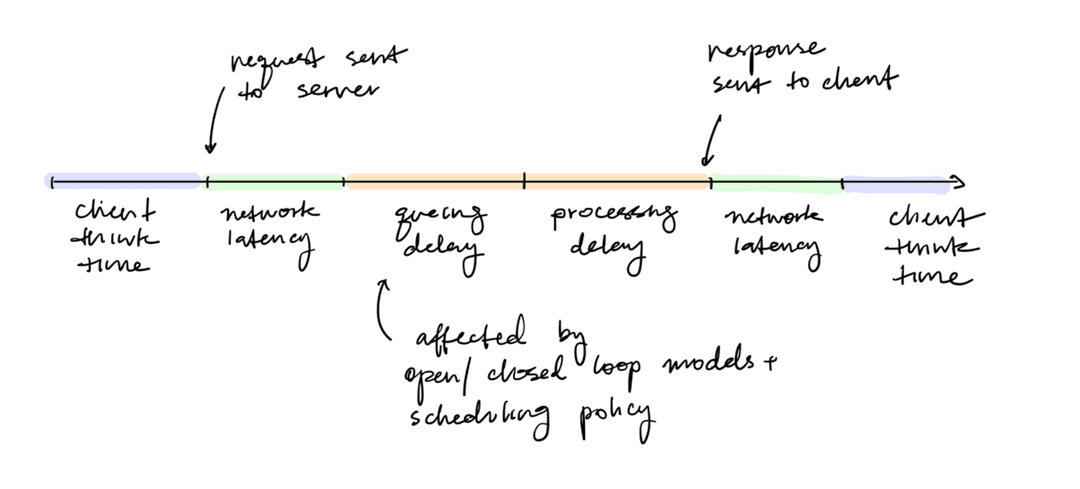
- For a given load, mean response times are significantly lower in closed systems than in open systems.
- Because an open-loop system has a fixed number of clients, there is an upper bound on the number of requests in the queue, and thus a limit on queuing delay.
- A closed-loop system can have a queue that grows indefinitely. This problem is generally addressed by dropping requests, buffering in a message queue, or applying backpressure on the clients.
- As the number of clients increases, closed systems become more similar to open systems.
- While service demand variability has a large effect in open systems, the effect is much smaller in closed systems.
- When there is service demand variability, short tasks become stuck behind long tasks in a queue (head-of-line blocking)
- Open systems have an unbounded queue size, so many short jobs can be stuck behind long jobs
- Closed systems have a fixed queue length, so fewer short jobs are stuck behind long jobs
- While open systems benefit significantly from scheduling with respect to response time, closed systems improve much less.
- Scheduling can prevent small jobs from queueing behind large jobs, which has a higher impact in open systems
- Closed systems only improve if there is moderate think time and a large number of clients.
- If think time is very low, then the scheduler cannot distinguish between clients
- If think time is very high, then server load is small, there is very little queuing delay, and thus scheduling does not have much of an effect
- Scheduling can limit the effect of variability in both open and closed systems, although the effect is less for closed systems due to principle (3)
- A partly-open system behaves similarly to an open system when the mean number of reqs per session is small. It behaves similarly to a closed system when the mean number of reqs per session is big.
- In a partly-open system, think time has little effect on mean response time.
References: Open Versus Closed: A Cautionary Tale
Issues with Measuring Tail Latency
- Most load-testers use a closed-loop system, underestimating tail latency.
- With enough load, clients may start to experience queuing delay, leading to a bias in latency measurements.
- Load testers that maintain an internal histograms with static buckets can lose information when latency exceeds the upper bound of the histogram. Histogram binning needs to be adaptive.
- For some systems, the estimated latency can converge to different values, even after running for a long time (hysteresis). If there is a pattern of hysteresis, then the measurement must be run multiple times, and the converged values should be aggregated (e.g. mean, median).
- A load-generator should have a warm-up, calibration (for histogram buckets), and measurement phase.
References: Treadmill: Attributing the Source of Tail Latency through Precise Load Testing and Statistical Inference
Attempted, Offered, and Achieved Load
Assume that an open loop request generator can achieve an infinitely high load (req/s). To decrease the load, increase the wait time between requests. To set an achieved load of tasks per second, we must wait seconds per task.
There are several ways to implement wait:
sleepis a system call that tells the operating system to pause a thread for a set amount of time. One issue is that the CPU scheduler will not necessarily start the process at exactly the desired time.- Busy loops are more accurate but are limited by the number of cores on the machine.
Assume that a closed loop request generator achieves a low load (req/s) because it needs to wait for a response. To increase the load (req/s) of a closed loop request generator, increase the number of threads performing work. If one request generator can achieve tasks per second, we can scale to tasks per second by having threads. Note that we can only increase load by a discrete amount.
Note that there is a difference between attempted load, offered load, and achived load:
- Attempted load (): the condition in which we want to measure the system; usually a configuration parameter in the workload generator
- Offered load: the number of req/s we actually generated with our workload generator
- Achieved load: the number of req/s the system actually did
In most cases, our offered load will be approximately equal to our attempted load. Any difference in attempted load and offered load is caused by implementation bugs. Our achieved load will always be equal or less than our offered load.
Poisson Process
A Poisson process models events as ocurring independently and at a constant average rate . It has two nice properties:
- It is memoryless, which means that the probability of an event in the next instant doesn't depend on how long we've already waited
- Events in non-overlapping time windows don't affect each other The convolution of multiple independent Poisson random variables results in another Poisson random variable whose mean is the sum of the two individual means. If packet arrivals follows a Poisson process with rate , then the number of events in a fixed window of length is:
For example, if , then the probability that load is greater than is
And if , then the probability that load is greater than is
In a real system, we might queue up requests instead. If is less than the amount of load that the server can manager, then the queue probably will not grow forever. There is a stable probability even when the timescale is infinite.
Metrics
Using this model with a Poisson distribution of offered load and queuing delay, there will be a latency distribution for each offered load:
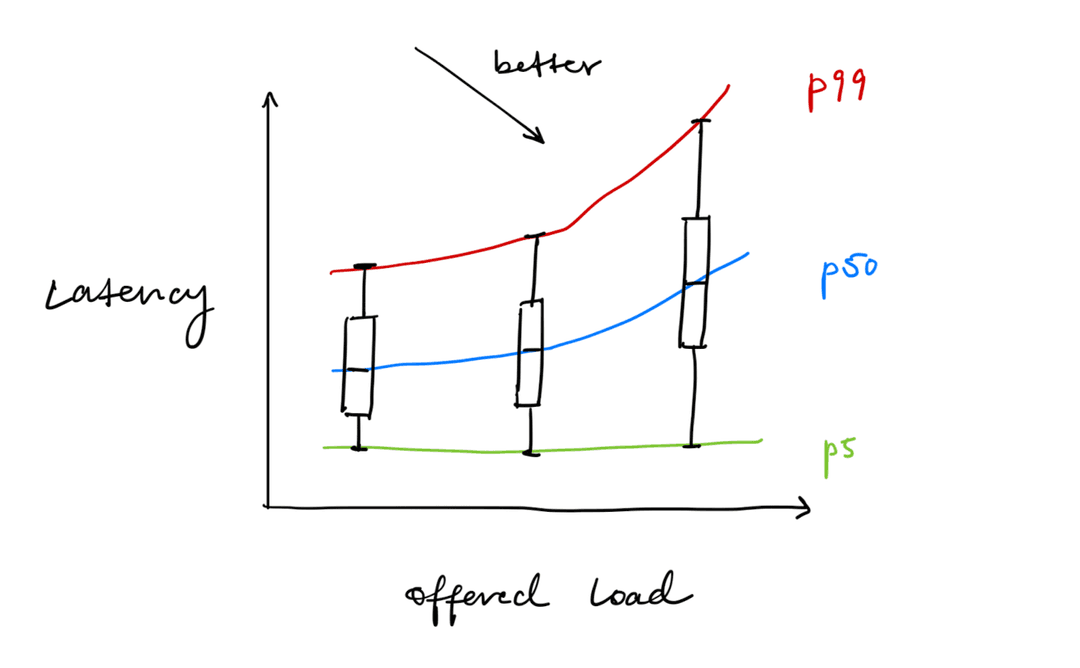
Question: How can we report a metric capturing both latency and throughput?
Generally, we establish an SLO (service-level objective) or SLA (service-level agreement) that promises that at Y latency, the system will satisfy an offered load of X.
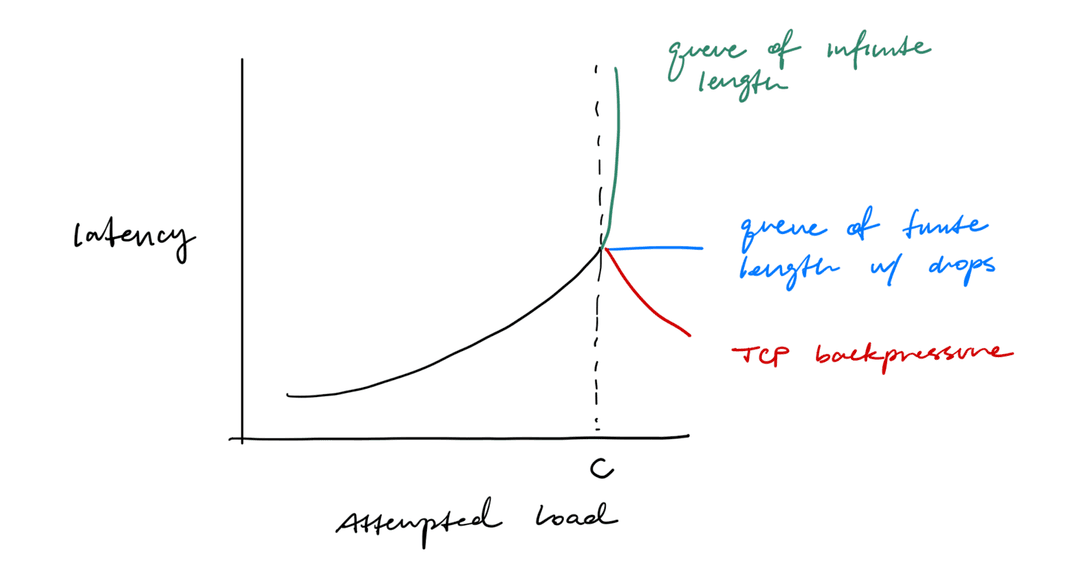
Question: What happens to latency when offered load is greater than the capacity of the system?
In some sense, we stop measuring the system at this point.
- If our queue can grow infinitely, then queuing delay will grow arbitrarily. At that point, there is no stable equilibrium.
- If the queue is finite length, we will start dropping packets. The latency will be the same as that of the latency at capacity.
- If the attempted load is too high, the client will start experiencing TCP backpressure, causing the offered load to drop. This will give the server a chance to recover, possibly decreasing latency.
If achieved load < offered load, the system is not in a constant state.
Performance Engineering
perf and flamegraphs
During the execution of a program, perf will interrupt the program many times and take a snapshot of the stack at the time of execution.
Flame graphs collects this data and shows frequent datapaths. My prefered profiling utility is samply.
Because perf writes to a buffer, it is possible for perf to drop samples. Make sure to set the sample rate such that it does not drop samples.
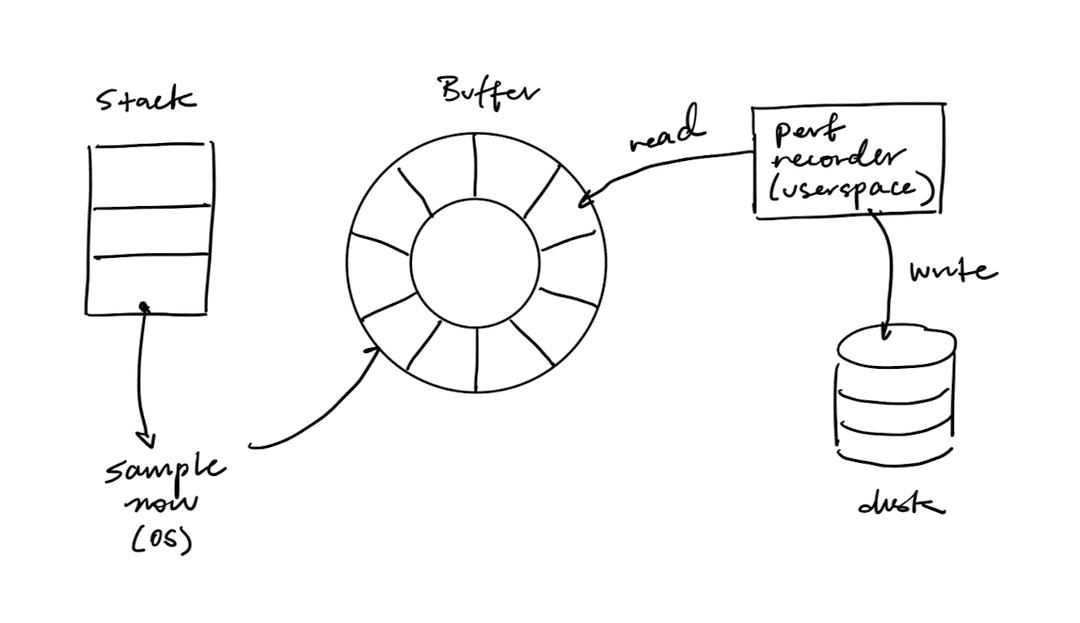
perf can also be used to cach the number of L1 cache misses. It can also be embedded directly in the running process with the perf-event Rust crate, which is a wrapper around the perf_event_open syscall.
References:
Block I/O
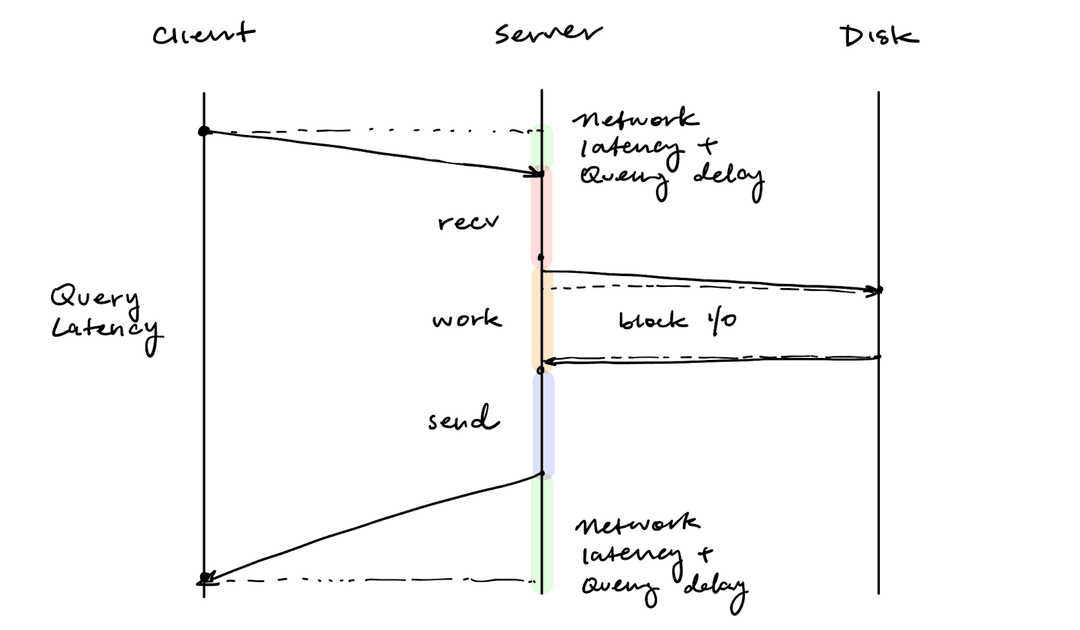
Note that perf can only interrupt the CPU and take a snapshot of the stack. Consider the latency of a single query, where the work mostly involves writing to the disk.
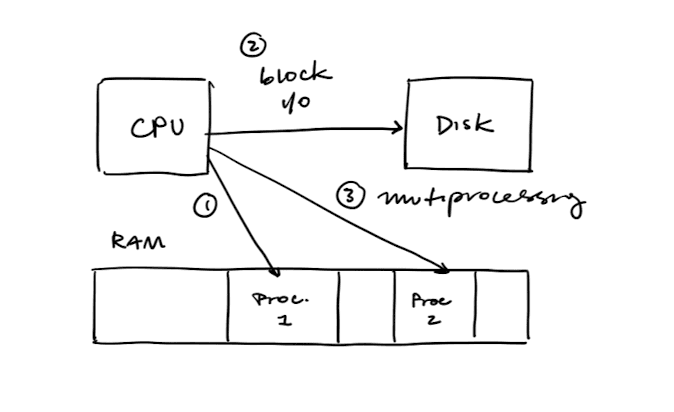
From the client's perspective, the majority of the latency comes from block I/O. However, from the CPU's perspective, it can hand off work to the slow disk and concurrently run other processes. Thus, disk I/O will not be represented in the flame graph despite causing most of the latency.
Cache Locality
An L1 cache can hold 32-128 KB of data per CPU core.
Consider the following workloads:
- Random reads to a hashmap
- Reads to the same key in a hashmap
- Reads to sequential keys in a hashmap
Reads to the same key will be much faster than random reads because the key fits within the L1 cache.
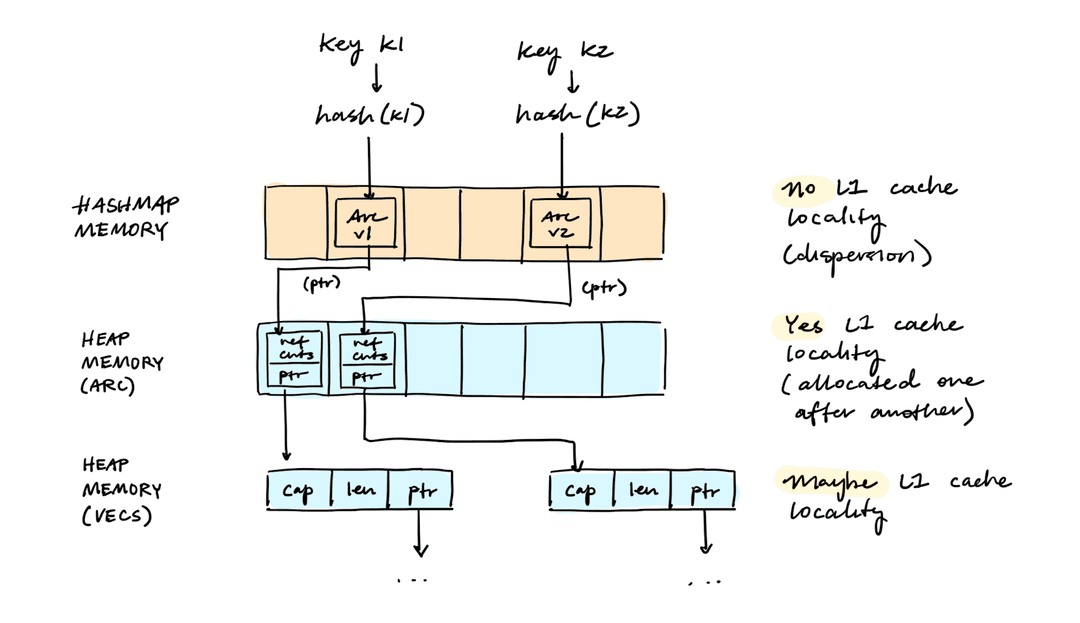
Reads to the sequential keys will be faster than random reads, but slower than reads to the same key. Because keys are hashed, the values are likely randomly dispersed in hashmap memory. However, if the values are heap allocated, it is likely that those have cache locality.
Consider sequential reads of a HashMap<Arc<Vec<u8>>>:
BTreeMap supports very efficient range lookups. It achieves this by laying out the memory of the values sequentially.
Network I/O
NICs
Network interface controllers (NICs) manage incoming and outgoing packets through ring buffers. Each slot in the ring buffer contains the length and physical address of another buffer (where packets can be stored). The NIC also has device registers to indicate to the CPU which portions of the ring buffer is available for reading and writing.
When the NIC receives a packet, the packet is stored in the next available buffer. The CPU is notified of this event with device interrupts.
The OS also fills the buffers with data to be sent, and then notifies the NIC to transmit the packet using device registers.
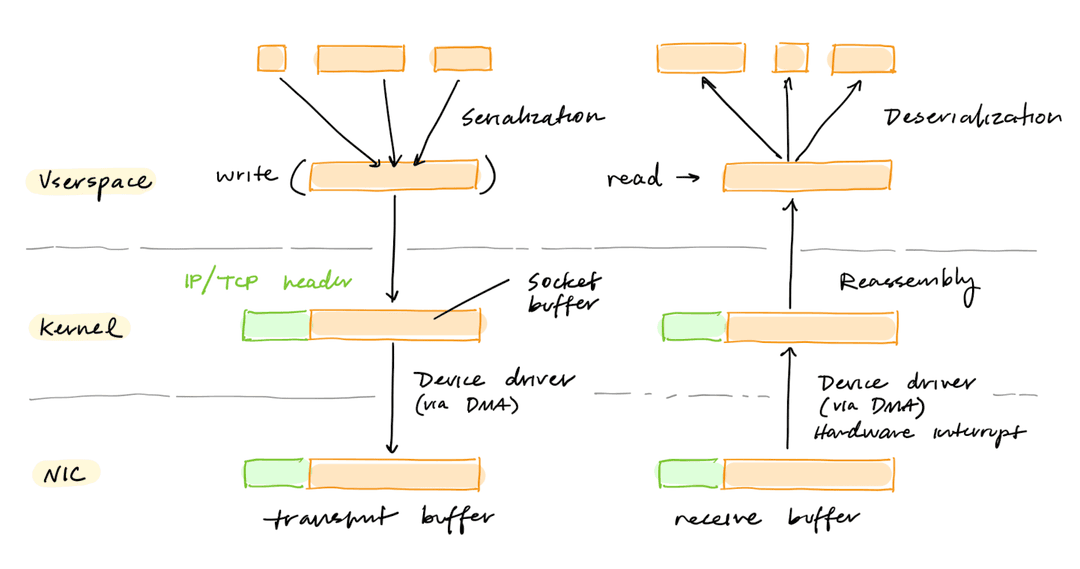
NIC Optimizations
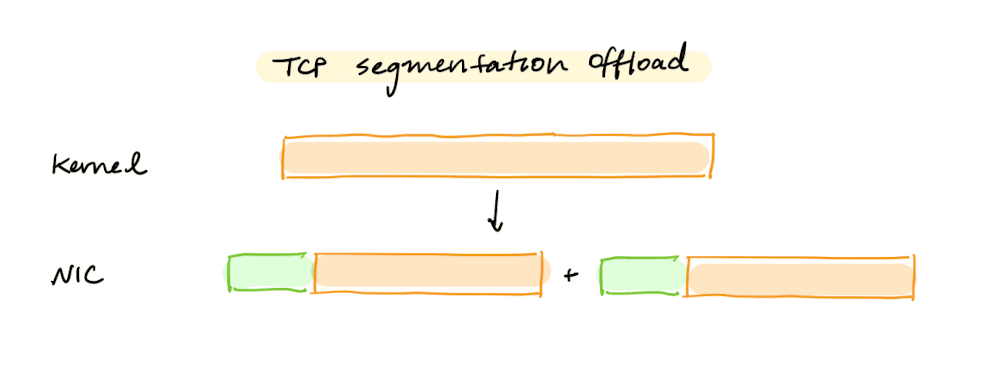
Many NICs can automatically segment large packets with their own IP/TCP header. This is called TCP segmentation offload.
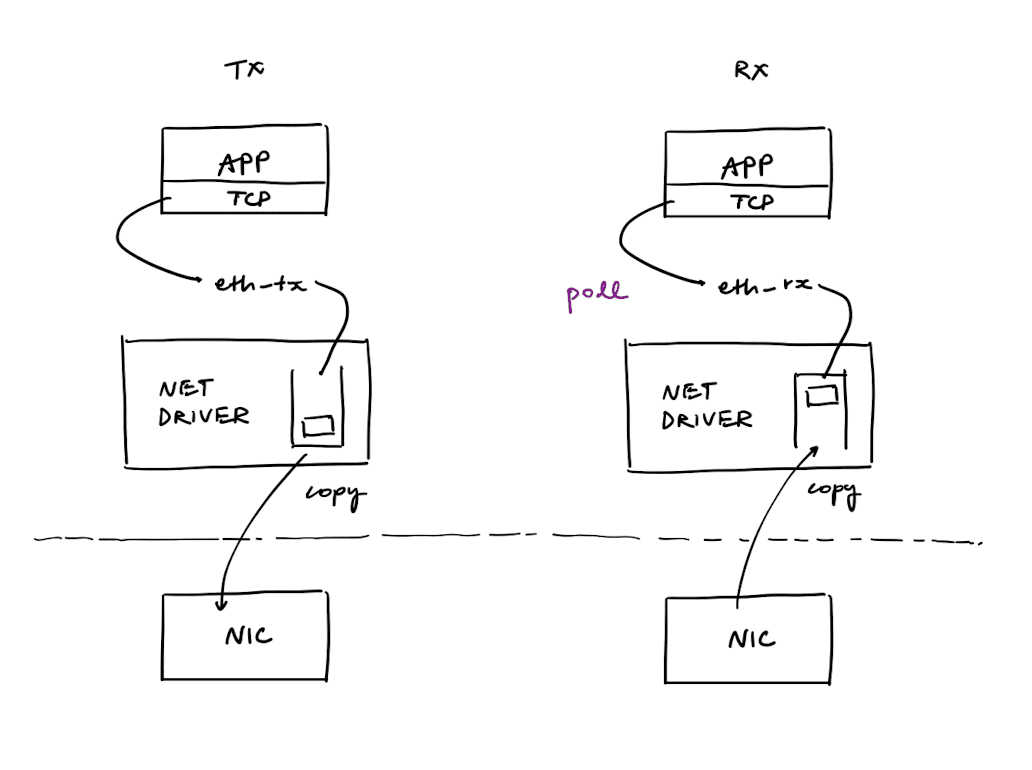
At high packet rates, interrupt processing can be expensive and can lead to a "receive livelock," or an inability to perform useful work above some load. To avoid this issue, some NICs have implemented polling device drivers and hardware interrupt mitigation. Some NICs also support multiple ring buffers, which helps spread the load on multiple CPU cores.
The C10K Problem
The C10K problem is the problem of scaling to tens of thousands of clients.
If there is one thread per connection, the scheduling overhead of threads starts dominating the application's performance.
First, consider what the server is doing in each connection:
loop {
    // send request
    write()
    // wait for response
    read()
    // handle either Ok(n) or Err(e)
}
write and the read are blocking operations on the socket transmit and receive buffers. When a blocking syscall ocurrs, the operating system parks the thread and schedules another thread on the CPU.
To avoid the context switch, we can instead make read and write non-blocking. Instead of just erroring on network errors, the read and write would also return EWOULDBLOCK if the operation would need to block.
Now we can iterate through the connections in a loop, trying to do the read and write operations. Note that we need to save a buffer for partial reads and writes.
enum State {
    Read { buf: [u8], n: usize }
    Write { buf: [u8], n: usize }
}

let conns: Vec<(Conn, State)> = ...
loop {
    for (conn, state) in &mut conns {
        match state {
            Read { buf, n } => {
                let k = conn.try_read(&mut buf[*n..])
                *n += k
                // if full message is in, flip to writing the response
                *state = Write { buf: ... , n: 0 }
            }
            Write { buf, n } => {
                let k = conn.try_write(&buf[*n..])
                *n += k
                // if response fully sent, go back to reading
                *state = Read { buf: [0u8; BUF_SIZE], n: 0 }

            }
        }
    }
}
This scheme is also a bit slow because the state of a connection only changes after iterating through all other connections. The solution to this is to have the operating system notify the service whenever there is a change to the receive and transmit socket buffers.
The poll system call watches multiple file descriptors (fds) to see if you can read or write to them. It returns the number of fds that are active. The successor to poll is epoll. Unlike poll, epoll_wait returns a list of ready fds. The kernel tells us whether a file descriptor (fd) is ready.1
Tokio is a thin wrapper around asynchronous I/O APIs. It calls epoll on Linux, kqueue on BSD or macOS, and IOCP on Windows.
More broadly, there are four approaches to the C10K problem:
| Approach | Mechanism | Tradeoffs |
|---|---|---|
| One thread with nonblocking I/O and level-triggered readiness | select, poll, /dev/poll, kqueue | Need to scan thousands of mostly-idle fds |
| One thread with nonblocking I/O and edge-triggered readiness | epoll, kqueue | Avoids rescanning |
| One thread with asynchronous I/O | aio | Avoids rescanning |
| Multiple threads | OS threads (1:1) or userspace threads (M:N) | Costs memory per thread; M:N has higher perf but complex |
The first two approaches are the poll/epoll solution discussed above. Asynchronous I/O (AIO) is provided by the aio interface, which associates a signal and value with each I/O operation. Signals and their values are queued and delivered to the user process. AIO is normally used with a edge-triggered completion notification, so that a signal is queued when the operation is done. However, it has the disadvantage of using a whole stack frame for each client, which costs memory.
Many operating systems also have trouble handling more than a few hundred threads. You can work around this by minimizing the size of the stack. When implementing a threading library, one can either put all the threading support in the kernel (1:1 model) or move a fair bit of it into userspace (M:N). While M:N was thought to be higher performance, it's very complex and hard to get right.
Other approaches discussed below including build the server code into the kernel (eBPF) or bringing the TCP stack into userspace, via netmap.
Netmap
netmap is a framework to reduce the cost of moving traffic between the hardware and the network stack.
There are three main packet processing costs:
- Per-packet dynamic memory allocations
- System call overheads
- Memory copies
netmap solves these problems by preallocating resources, amortizing system call overheads through batching, and eliminating memory copies by sharing buffers and metadata between kernel and userspace.
In the framework, the NIC is disconnected from the host protocol stack. Instead netmap creates netmap rings, which are replicas of the ring buffer implemented by the NIC. These netmap rings allow the application to have shared packet buffers with the NIC.
To avoid ownership issues, the netmap ring is owned by the userspace program, except during the execution of a system call, when it is updated by kernel code running in the context of the user process. The packet buffers that can be read from or written into are owned by the userspace program, while the rest are owned by the NIC. The boundary is updated during system calls.
netmap still uses select() and poll() for synchronization.
Some strengths of netmaps over other frameworks are that (1) it does not depend on specific hardware, (2) has been integrated in FreeBSD and Linux, and (3) supports unmodified libpcap clients (through a compatibility library).
References: netmap: a novel framework for fast packet I/O
Reducing Packet-Processing Overhead
Besides netmap, there are several other approaches to reducing packet-processing overhead:
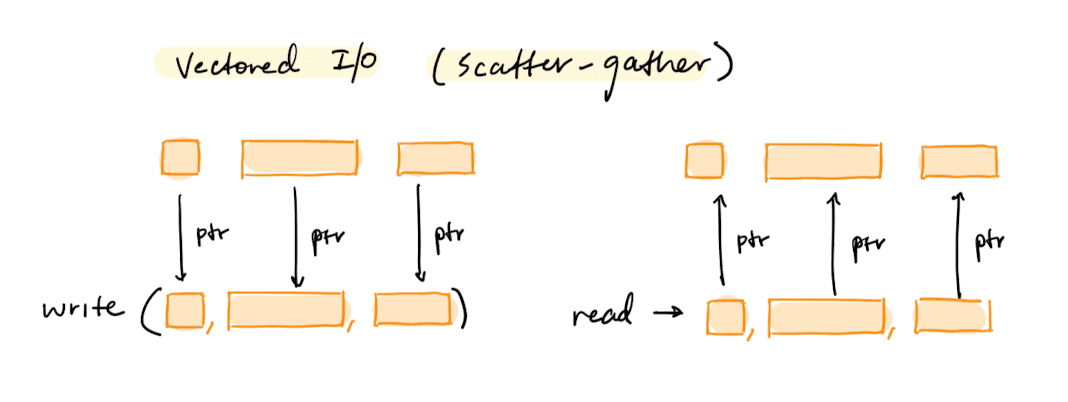
- Vectored I/O batches reads/writes across multiple buffers in a single syscall:
- Userspace networking libraries like DPDK allow running the full networking stack in userspace. This requires custom device drivers, and moves work from the OS into the application (as opposed to RDMA, which moves TCP onto the NIC).
-
RDMA2 (remote direct memory access) allows the NIC to make remote memory reads and writes without CPU involvement on either side. One problem we have is: how do we guarantee reliable delivery? We can either try to put the TCP stack on the NIC (IWARP), or we can just make a reliable network (RoCE). RoCE avoids congestion loss with PAUSE and RESUME frames, and avoids corruption loss with NACKs.
-
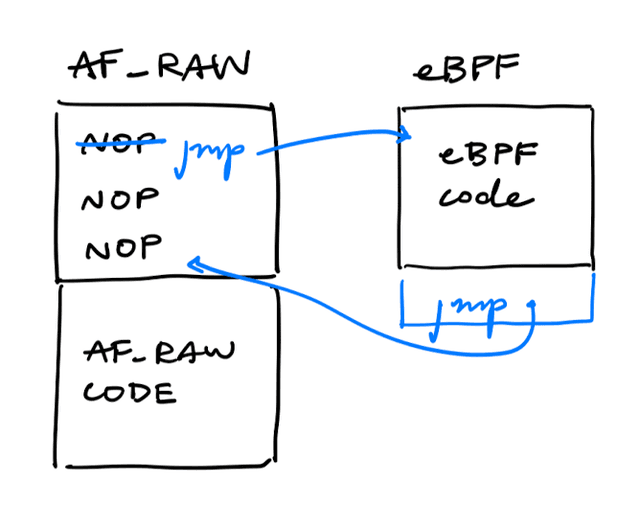
eBPF (Extended Berkeley Packet Filter) allows users to write programs3 that are triggered on hooks in the kernel.
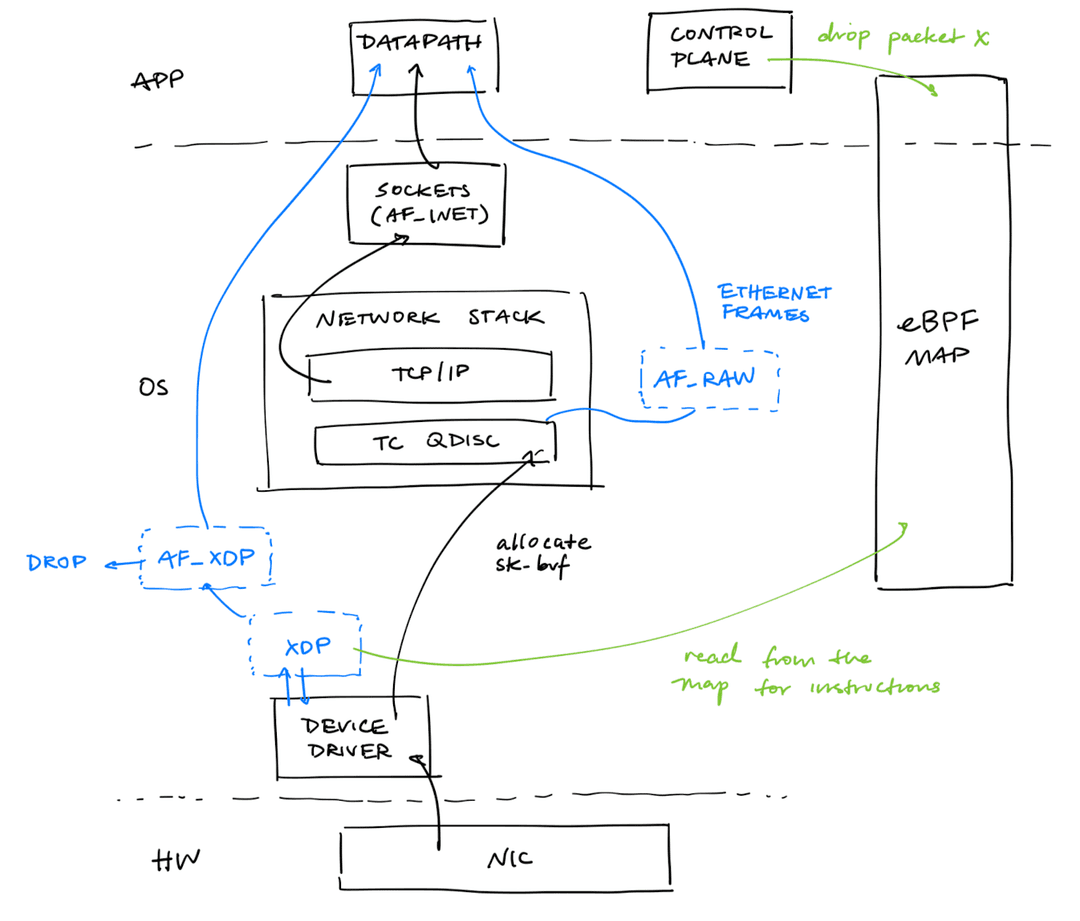
XDP (eXpress Data Path) is a hook that runs eBPF programs directly in the device driver, before the kernel allocates an sk_buff or the packet enters the network stack. Because it runs this early, XDP can drop or redirect packets (via an AF_XDP socket) with very little overhead. This is earlier than the TC (traffic control) qdisc hook, which runs after sk_buff allocation and is reached over AF_RAW sockets as raw Ethernet frames.
An eBPF map lets userspace (the control plane) share state with an in-kernel eBPF program without reloading the program. For example, the control plane can write "drop packet X" into the map, and the eBPF program attached at the XDP hook reads the map on each packet to decide whether to drop it.
-
Packet filter hooks like Netfilter intercept traffic from/to the driver and pass it to processing modules without additional data copies.
-
Click supports constructing packet-processing chains (through modules) that run directly within the kernel.
-
Some hardware has been designed specifically to support high-speed packet handling with special features (such as filtering or forwarding). This has often been done with FPGAs or programmable NICs ("smart NICs," which are NICs with a CPU in them).
io_uring
One issue we now face is that we have too many interfaces to the operating system for syscalls, vectored I/O, epoll, and AIO.
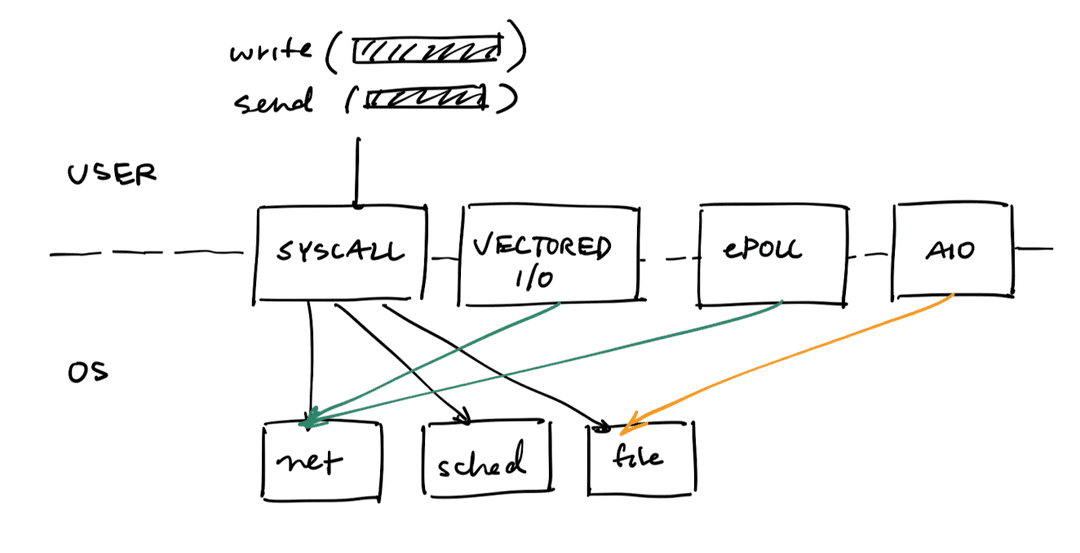
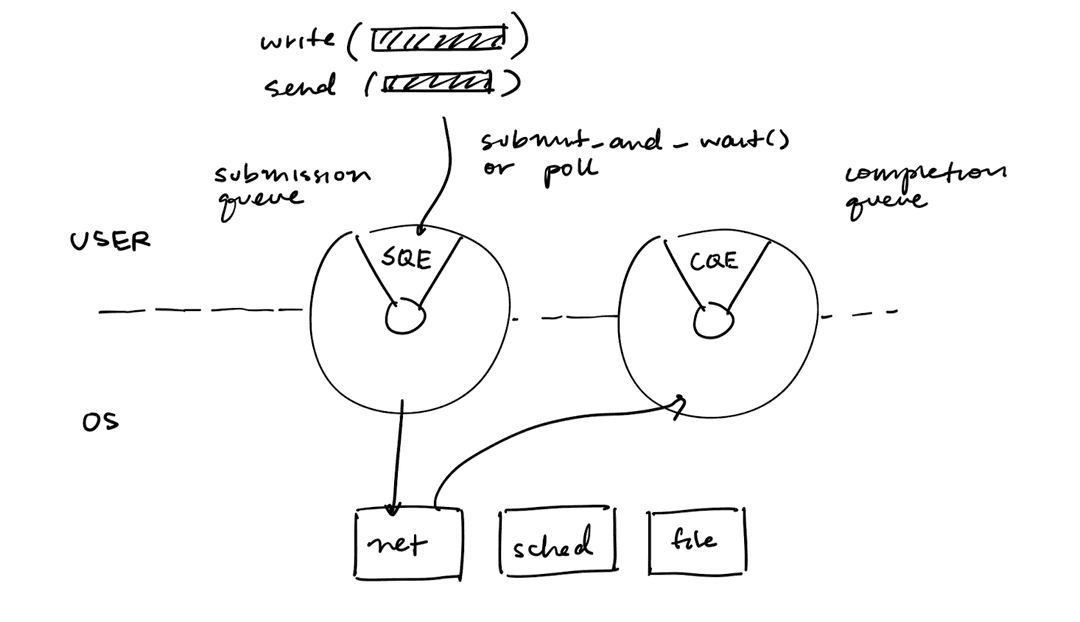
io_uring exposes one interface with a submission queue (SQ) and a completion queue (CQ).
The benefits of io_uring is that it:
- Uses ring buffers shared between userspace and the kernel, requiring no syscalls for operations
- Provides async support across files, sockets, and more
- Batches requests and completions, amortizing the cost of context switches and syscalls
Concurrency
Threads
A thread is the smallest unit of execution with a program counter and stack. The OS is responsible for scheduling threads on the CPU and managing its lifecycle.
A kernel thread is responsible for executing kernel logic, such as handling context switches and system call. Every userspace thread must have a kernel thread associated with it.
There are three ways to do this:
- M uthread : 1 kthread
- 1 uthread : 1 kthread
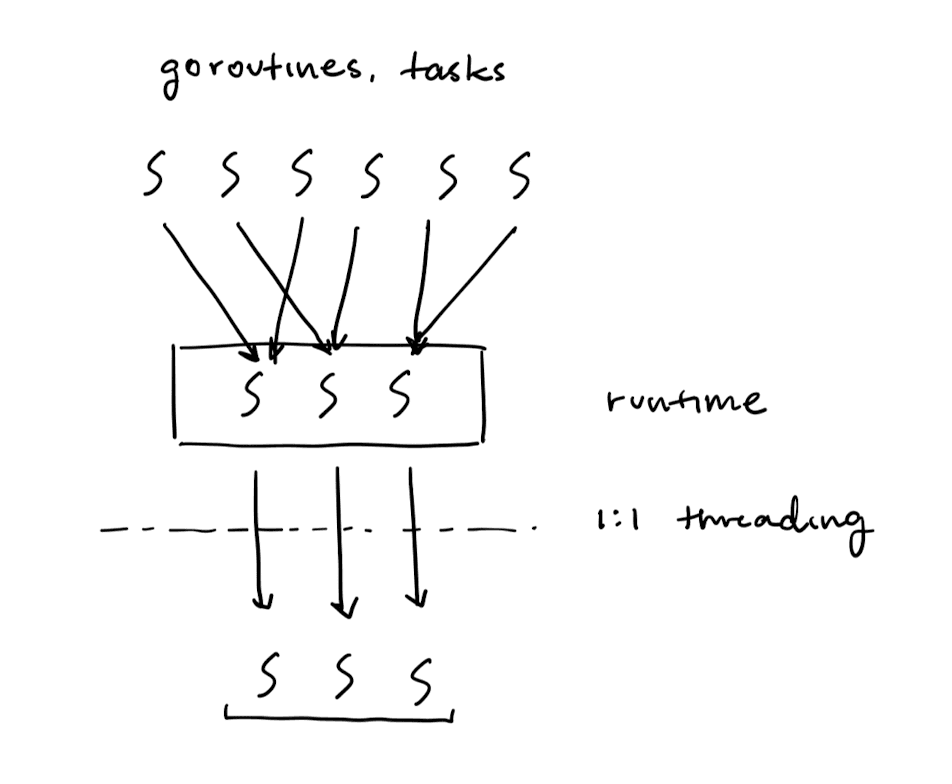
- M uthread : N kthread
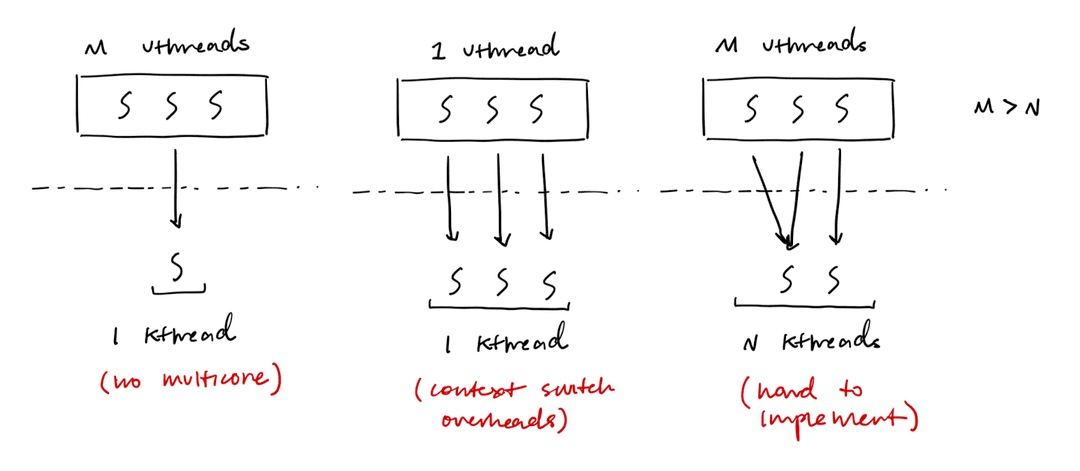
One issue with 1:1 threading is the additionanl overhead of context switches:
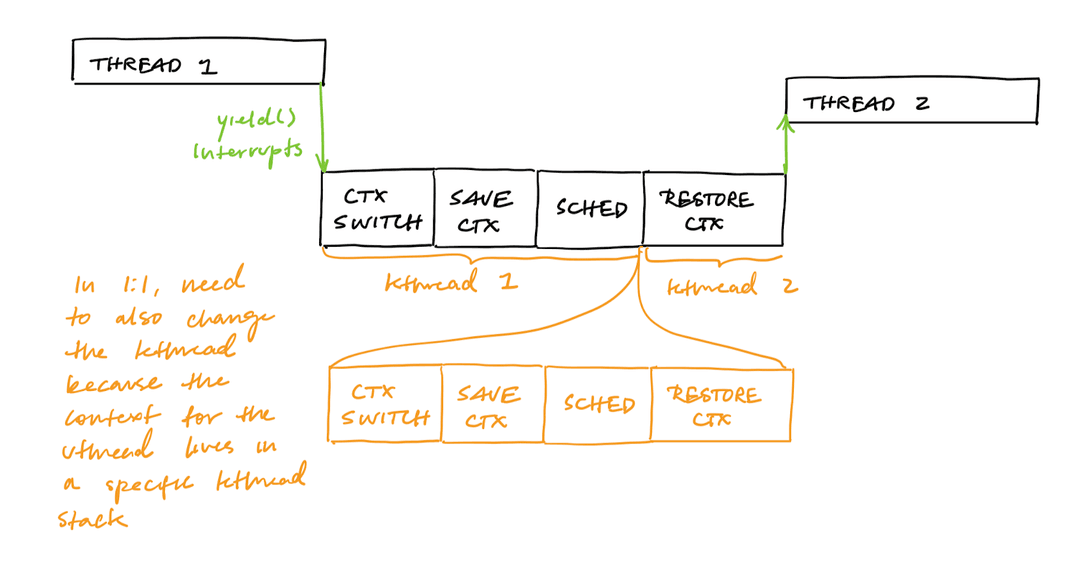
Because M:N is difficult to implement in the kernel, many runtimes implement it themselves in userspace.
Moore's Law
Why do we want threads?
- Coroutines (concurrency) makes programming easier
- Parallelism
Moore's Law states that the number of transistors on a chip should double every two years.
Dennard scaling states that as transistor density increases, their power density stays constant. As the dimensions shrinks by a factor , voltage and current also scale down by , so power per transistor drops by . This offsets the increase in transistor density, keeping power density flat.
Smaller transistors are faster because the electron needs to travel a shorter distance and the capacitance needed to switch the transistor is lower. Thus, we can get a faster CPU clock cycle for the same amount of energy.
This worked from 1976 to 2006, but then stopped. The power density started to increase as transistors got smaller, melting the silicon. The end of Dennard scaling is why we currently have 3-4 GHz CPUs instead of 8 GHz CPUs.
There are multiple ways to "continue" Moore's law
-
Very Long Instruction Word (VLIW)4 executes multiple instructions per clock cycle (IPC). This is a form of instruction-level parallelism.
-
Vectored processors (SIMD) processes multiple pieces of data with a single instruction. This is a form of data-level parallelism.
-
Multicore programming runs certain instructions in parallel. Amdahl's law states that the max speedup we can get from multicore programming is:
Where:
- is the proportion of the task that can be parallelized or improved
- is the speedup factor of the parallelized portion
Strong scaling is how much faster our program runs for the same input, given that we increase the number of processors. Strong scaling must obey Amdahl's law.
Weak scaling is how much more work (problem size) we can do with a larger number of processors.
Hyper-threading (HTT) is a form of simultaneous multi-threading (SMT) that allows a single CPU to act as two cores. It does this by duplicating parts of the core, like registers and instruction pipelines.
RDMA is widely used in databases. See: CSCI 2690 Notes.
Intel Itanium was a billion-dollar investment in the VLIW architecture. Unfortunately, it eventually failed because it requires either the program or the compiler to be extremely complicated. Additionally, in IO heavy contexts, data dependencies make very high IPC impossible. But SIMD was eventually adopted into x86-64.